Bank of Baku ❤️ Log In

Security note: This Bank of Baku log in guide does not link to banking login pages. Type the official Bank of Baku address yourself, check the domain carefully, and never enter your customer code, PIN, password, Asan Imza details, or QR login approval after clicking a message, ad, or suspicious email.

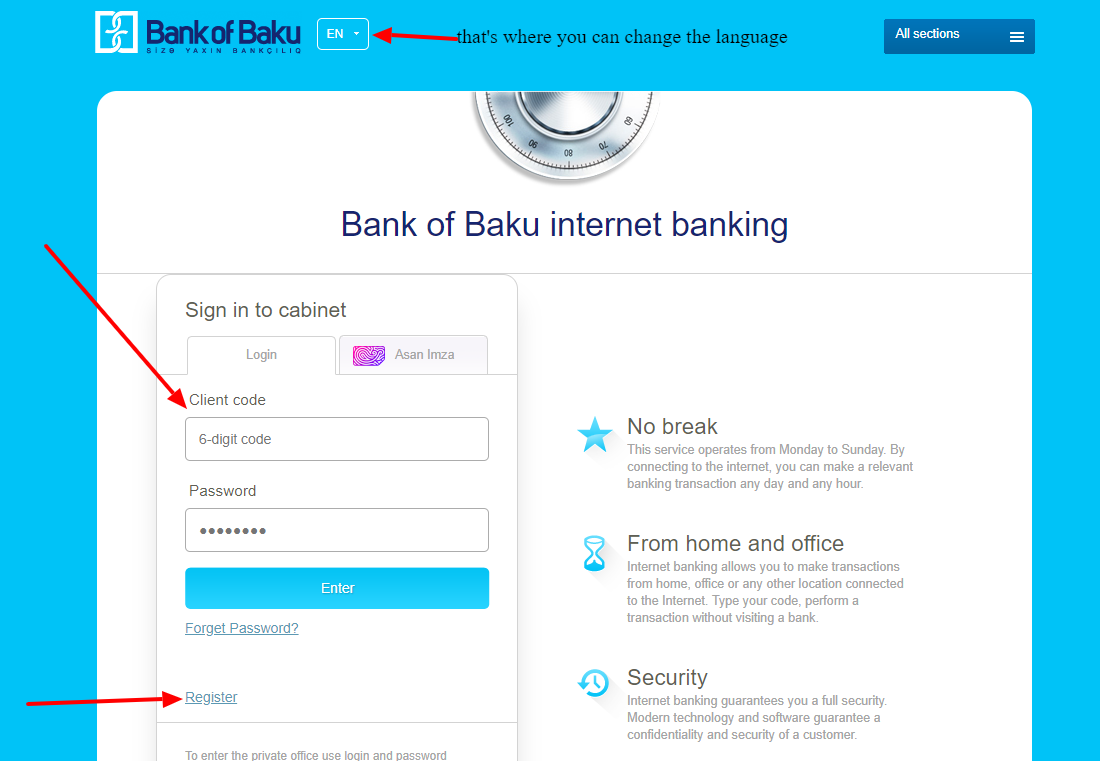
Need to complete Bank of Baku log in for Internet Banking? Bank of Baku’s current internet banking screen supports customer-code/password login, Asan Imza login, QR Login, registration, and password recovery. That is much more useful than the old screenshot-based advice this page used to show.

The safe approach is simple: open Bank of Baku directly, choose Internet Banking, then use the login method that matches the access you received from the bank. If Bank of Baku log in fails, check the customer code, user password, Asan Imza details, QR login app state, or activation status before trying again.


How to Log In

Use customer code and password

  1. Open the official Bank of Baku site yourself.
  2. Choose the Internet Banking area.
  3. Enter the customer code or PIN code requested on the login screen.
  4. Enter the user password received or registered for Internet Banking.
  5. If the screen rejects the password, use the official password recovery flow instead of guessing.

Use Asan Imza or QR Login

  1. Choose Asan Imza if your Bank of Baku access is tied to that identity method.
  2. Enter the customer code, mobile number, and Asan Imza user ID requested on the screen.
  3. Use QR Login only when you opened Internet Banking from the official page and can verify the prompt.
  4. Approve only the login you started yourself.
  5. Call Bank of Baku support at the official short number shown by the bank if the login method does not match your account.

Bank of Baku log in is available every day, but the right method depends on how your access was activated. Customer-code login, Asan Imza, and QR Login are not the same thing, so do not switch between them randomly when one method fails.


First-Time Access and Activation

If this is your first Bank of Baku log in, you may need to activate Internet Banking before normal login works. Bank of Baku’s own internet banking information says customers may need to visit a branch with an ID card and sign the i-banking agreement to join the service.

  • Customer code: Use the customer code requested by the Internet Banking screen.
  • User password: Use the password provided by the bank or created through the official setup process.
  • Main mobile number: Bank of Baku says the mobile number should match the number registered in the bank’s database.
  • Asan Imza: Use this only if you have active Asan Imza access for the account.

If your Bank of Baku log in was never activated, password recovery will not always solve the problem. In that case, use the bank’s official support or branch path to confirm whether Internet Banking is enabled for your account.


Known Issues & Common Problems

Customer code mismatch

The password recovery screen asks for the customer code used for Internet Banking. If you enter a card number, phone number, or different identifier, the recovery path may not work.

Not activated yet

Bank of Baku says activation can require branch enrollment and an i-banking agreement. If the account was never enrolled, the login page may reject correct-looking details.

Asan Imza details wrong

Asan Imza login asks for more than a normal password. Check the customer code, mobile number, and user ID before assuming the account is locked.

QR login approval risk

QR Login is convenient, but it should only approve a session you opened yourself. If a QR prompt appears after a message or unknown page, stop and open the bank site manually.


Troubleshooting Tips and Security Tips

Troubleshooting Tips

  • Confirm that Internet Banking has been activated for your Bank of Baku account.
  • Check whether the screen asks for customer code, PIN code, password, Asan Imza details, or QR Login.
  • Use the password recovery flow when the password is wrong, but enter the same customer code used for Internet Banking.
  • Make sure the main mobile number matches the number registered with Bank of Baku.
  • Call the official Bank of Baku support number shown by the bank if repeated attempts fail.

Security Tips

  • Do not start Bank of Baku log in from email, SMS, messenger, forum, or ad links.
  • Never share your password, customer code, PIN code, Asan Imza user ID, or QR approval with another person.
  • Approve QR Login only when you started the browser login yourself.
  • Use a private device and close old browser tabs before entering banking details.
  • If you approved a suspicious login, contact Bank of Baku immediately through official support.

Contact Customer Service

For Bank of Baku log in problems, use the support details shown on the official Bank of Baku site or Internet Banking screen. The current login page points users to the bank’s official short support number for more information.

  • Activation problem: Ask whether your account is enrolled for Internet Banking.
  • Password problem: Use official password recovery before making many failed attempts.
  • Asan Imza problem: Confirm the mobile number and user ID registered for the account.
  • Suspicious QR approval: Contact the bank immediately and ask for account protection steps.

Related Log In Guides

These related bank login guides may help if you are comparing digital banking access steps:


Frequently Asked Questions

Where should I start Bank of Baku log in?

Start from the official Bank of Baku site or the official Internet Banking screen. Do not use message links, search ads, or old screenshot links.

What details does Bank of Baku Internet Banking ask for?

The normal screen can ask for a customer code or PIN code and a password. Other routes may use Asan Imza details or QR Login.

Why does Bank of Baku log in fail with the right password?

The account may not be activated for Internet Banking, the customer code may be wrong, the registered mobile number may not match, or the selected login method may not fit your account.

Can I recover my Bank of Baku password online?

Bank of Baku provides a password recovery path that asks for the customer code used for Internet Banking. Use the official recovery screen only.

Is QR Login safe for Bank of Baku?

QR Login can be safe when you start it from the official Bank of Baku Internet Banking page. Do not approve QR prompts from unknown pages or messages.

Is this page the Bank of Baku login page?

No. This is an independent help guide. Open Bank of Baku directly and verify the official domain before entering banking details.

Bank of Baku log in is easiest when you use the exact method assigned to your account: customer-code login, Asan Imza, or QR Login. If access was never activated, solve that first through the bank’s official support or branch route.

Last Updated on June 2, 2026

URL: https://log-in.me/bankofbaku-baku-azerbaijan/