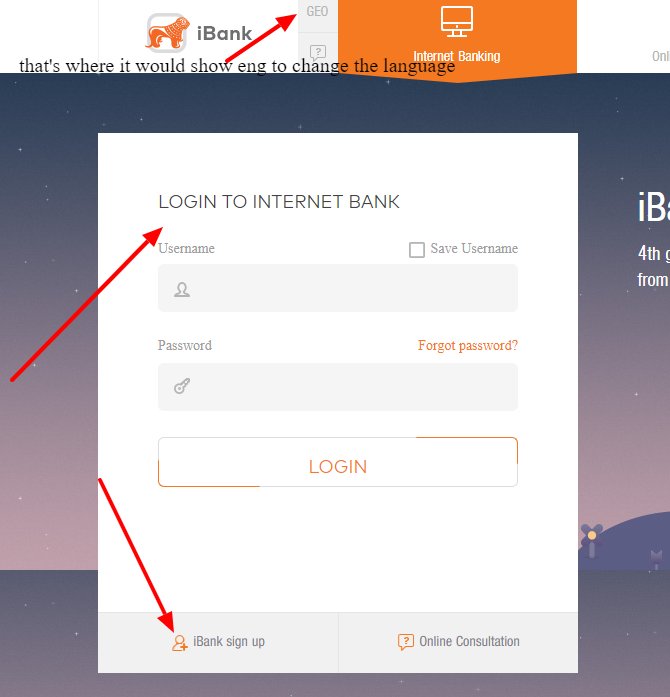
Bank of Georgia ❤️ Log In

If Bank of Georgia Log In is failing, first decide which channel you are using. Bank of Georgia has a modern BOG App for personal banking, an internet bank login for browser access, and separate business digital banking flows. The fix is often different for each one.

Use this guide when you need a practical next step for the Bank of Georgia app, password reset, one-time code, card access, or web banking route. Start with the channel you actually use, then move to support only when the problem points to identity, contact details, or card controls.


Quick Access: What to Try First

  1. BOG App: use this for everyday personal banking, cards, bills, transfers, deposits, savings, and in-app support.
  2. Internet bank: use browser access when you need a bigger screen or when the app is not the right channel.
  3. Password reset: if the reset form asks for details you cannot enter, record the exact screen instead of guessing.
  4. One-time code: check whether your registered mobile number, roaming state, and contact details still match the bank profile. Foreign mobile numbers can work when they are registered correctly.
  5. Card or PIN issue: if the app opens but card details look wrong, treat it as card support, not only login support.


How to Log In

Bank of Georgia Log In usually means one of three things: the BOG App, the personal internet bank in a browser, or the business internet/mobile bank. Pick the matching path before troubleshooting. Mixing personal app steps with business internet-bank steps wastes time.

BOG App

  1. Open the official Bank of Georgia app from the store entry published by BANK OF GEORGIA, JSC.
  2. Use the login method already tied to your bank profile. The app is built for account opening, digital debit cards, bill payments, transfers, card controls, deposits, savings, remittances, and in-app support.
  3. If you are registering for the first time, be ready for identity checks and contact details that match the bank record.
  4. If the app opens but one feature fails, test one simple read-only action first, such as checking account balance or card list. That tells you whether login itself works.
  5. If the app asks for an update, update from the official store only. Do not install banking APK files from random search results or message links.

Internet Bank

  1. Open Bank of Georgia from its official website or a bookmark you created yourself.
  2. Choose the correct personal or business login area before entering anything.
  3. Expect extra authorization. Bank of Georgia’s browser and app channels may use one-time codes, mobile confirmation, or other verification depending on the action.
  4. If you are a business user, do not use a personal app problem as proof that business internet banking is broken. Check the business channel separately.
  5. If browser login fails after an app update, try a private browser window, then test another network. If the same identity step fails again, contact support with the exact message.

If you use the premium/foreign-customer route, see the separate Bank of Georgia SOLO Log In guide. For nearby Georgia banking comparisons, see the guides for TBC Bank, Basisbank Georgia, Liberty Bank Georgia, and ProCredit Bank Georgia.


Bank of Georgia Login Methods

Bank of Georgia has pushed much of its everyday banking into the BOG App. The Google Play listing says the app has more than 1,000,000 downloads, about 37,800 reviews, and is used for accounts in GEL, USD, EUR, and GBP. The same listing describes 24/7 support by text, call, or video chat, which matters when the problem is not just a forgotten password.

  • Personal mobile banking: best for daily banking, cards, transfers, bill payments, remittances, QR withdrawals, savings, offers, and support chat.
  • Personal internet banking: best when you prefer browser access, need a larger screen, or cannot complete a task inside the mobile app.
  • Business mobile and internet banking: best for company finance work, invoice handling, business transfers, approvals, currency conversion, and business products.
  • Phone, chat, email, or branch: best when identity, phone number, card PIN, blocked profile, or one-time-code delivery needs human support.

Use Bank of Georgia Log In as a channel choice, not as one magic button. If you cannot enter a required ID, phone number, email, or verification code, the next useful step is to document the failed field and ask Bank of Georgia to correct the profile or explain the required value.


Known Issues & Common Problems

Most Bank of Georgia access problems are not solved by repeatedly changing devices. Put the problem into the right bucket first. The colored boxes below show what needs fast support and what you can safely test yourself.

🔴 Password reset field mismatch

Recent public app feedback mentions a password-reset path where the email option asks for an ID number and then another email-related value. If a field only accepts digits when you expect text, take a screenshot for yourself and contact support with the exact sequence.

⚠️ One-time code does not arrive

One-time-code trouble can be caused by roaming, an old registered number, mobile-network delay, blocked SMS, or a profile setting. Bank of Georgia can accept foreign mobile numbers, but the number still needs to be the one registered on your bank profile. If you changed SIM cards or phone numbers, contact support before assuming the password is wrong.

⚠️ App is slow or hard to read

Public reviews include complaints about small fonts and clunky screens. If accessibility is the issue, try the phone’s display-size settings, keep the app updated, and use browser banking when a larger screen is safer.

📋 Card PIN or card settings are confusing

Card controls are part of the app experience, but not every card issue is a login issue. If card PIN, card limits, or card visibility is the only broken part, explain that clearly when contacting the bank.


😤 Customer Complaints & Common Problems

Bank of Georgia’s app has a strong public rating overall, but the negative reviews are still useful because they show the exact places where login-adjacent problems can happen. Treat these as warning patterns to describe clearly to support, not proof that every customer will hit the same bug.

🔴 Password reset friction

  • Source: Google Play Bank of Georgia app review, December 11, 2025. A reviewer described password reset through the email option asking for ID details and “favorite email”, then said “only digit keyboard available”. If you hit that, report the exact reset path.

⚠️ Readability and navigation

  • Source: Google Play Bank of Georgia app review, November 26, 2025. One reviewer called the app “very clunky and inconvenient” and complained that small fonts made it hard to use. That points to readability and navigation problems, not only password trouble.

📋 Card-control confusion

  • Source: Google Play Bank of Georgia app review, December 19, 2025. A card-control complaint asked to “set a card PIN in-app”. The store listing’s later update text says PIN changing is now part of the app, so an outdated app version may matter.

✅ Use official support channels

  • Source: Google Play Bank of Georgia listing, December 15, 2025 update. The listing says the app supports text, call, and video chat support. If the login screen blocks you, use those official support routes instead of searching for unofficial contact numbers.

Troubleshooting Tips

When login itself fails

  1. Check whether you are on the personal, business, app, or web login route.
  2. Update the BOG App only from the official store entry published by Bank of Georgia.
  3. Restart the app once, then test a different trusted network if the login page will not load.
  4. If password reset asks for an impossible value, do not keep guessing. Record the field name, keyboard type, and error message.
  5. If one-time codes fail, check roaming, SMS blocking, and whether your current number is still the one registered with the bank.

When login works but banking does not

  1. Check whether simple account viewing works before trying transfers, card changes, or payments.
  2. If a card is missing, blocked, or showing the wrong control options, ask for card support rather than password help.
  3. If a payment fails, save the time, amount, currency, recipient type, and any reference number shown.
  4. If fonts or layout make the app unsafe to use, switch to browser banking on a larger screen for important actions.
  5. If both app and web fail, use official phone, email, chat, video chat, or a service center. That is likely a profile or security issue.

Security Tips

Before you enter details

  • Open Bank of Georgia from a saved bookmark or the official app, not from a message link.
  • Never share one-time codes, card PINs, full card numbers, app passwords, or recovery answers with callers.
  • Be suspicious if a page asks you to install a separate file before login.
  • Keep your device lock, app updates, and operating-system updates current before using mobile banking.

If something feels wrong

  • Exit before entering a password if the page name, language, or design suddenly looks unfamiliar.
  • Use official Bank of Georgia support to confirm whether a message, call, or login prompt is real.
  • Block or freeze cards inside the official app if you see unknown transactions and still have app access.
  • If you lost your phone, treat the app as a security issue, not only a login issue. Contact the bank quickly.

Contact Customer Service

Bank of Georgia’s public app listing identifies the developer as BANK OF GEORGIA, JSC and lists Tbilisi address details at 29a Gagarini Street. It also lists customer-service email and app-support email contacts. Other public contact directories and Bank of Georgia documents consistently show the main phone number as (+995 32) 2 444 444.

  • Use in-app support first when you can still open the BOG App. The official app listing describes text, call, and video chat support.
  • Use phone support when one-time codes, blocked access, lost phone, or possible fraud need quick handling.
  • Use email when you need to explain a longer password-reset bug, profile-detail mismatch, or app-screen problem with screenshots.
  • Use a service center when identity, residency, phone-number changes, or account-opening details cannot be fixed online.

When contacting support, include the channel, device, app version if visible, country where you are trying to log in, whether SMS works for other services, and the exact step where the Bank of Georgia Log In process fails.


Frequently Asked Questions

What is the safest way to start Bank of Georgia Log In?

Use the official BOG App or Bank of Georgia website route you already trust. Do not start from message links, ads, unofficial app files, or copied login URLs from old articles.

Can I use the BOG App for normal banking?

Yes. The official app listing describes account opening, digital debit cards, payments, transfers, card controls, deposits, savings, remittances, QR withdrawals, and support inside the app.

What should I do if password reset asks for an impossible field?

Record the exact screen, field name, keyboard type, and error message. Then contact Bank of Georgia support, because that is likely a profile or app-flow issue rather than a normal forgotten-password problem.

Why is my one-time code not arriving?

Possible causes include roaming, network delay, SMS blocking, an old registered number, or a profile setting. Foreign mobile numbers can work when registered correctly, so the key check is whether the number on the bank profile matches the number you are using now.

Is business internet banking the same as the personal BOG App?

No. Personal app access and business digital banking serve different jobs. Use the business channel for company finance tasks, approvals, invoices, business transfers, and business account management.

What if I can log in but cannot change a card PIN or card setting?

Treat that as a card-management problem, not only a login problem. Check for app updates and contact Bank of Georgia with the exact card action that fails.

Should I install a Bank of Georgia APK from a search result?

No. Banking apps should come from official app stores or the bank’s own trusted route. Random app files create unnecessary security risk.

What details should I give support?

Give the login channel, device, app version if visible, country, registered phone situation, exact error message, time of failure, and whether web and app access fail in the same way.


Bottom line: the useful Bank of Georgia Log In fix is to identify the channel, confirm your registered contact details, and avoid unofficial login routes. If the app or web login blocks you at an identity, password, OTP, or card-control step, collect the exact details and use official Bank of Georgia support.

Notice: This page is an independent informational guide. It does not provide a login form, does not provide direct login links, does not request passwords, PINs, one-time codes, account numbers, or card details, and does not collect banking data. If you need to access your Bank of Georgia account, use Bank of Georgia’s official app, website, phone support, or service center directly.

Last Updated on June 6, 2026

URL: https://log-in.me/bankofgeorgia-tbilisi-georgia/