Bank of Nevis ❤️ Log In

Having trouble with Bank of Nevis Log In? Start from The Bank of Nevis official website and choose the banking service that matches your account. The bank currently presents MyBON Online for its enhanced platform, while its banking page also lists B-Online, BON, and separate personal and business credit-card access. Picking the wrong entry can look like a password problem even when your details are correct.

This guide explains the safe Bank of Nevis Log In routine, first-time setup, practical fixes, security steps, and the contact details to use when access still fails. It does not send you through an unknown login button. Open the bank’s official site yourself and continue from there.


How to Log In

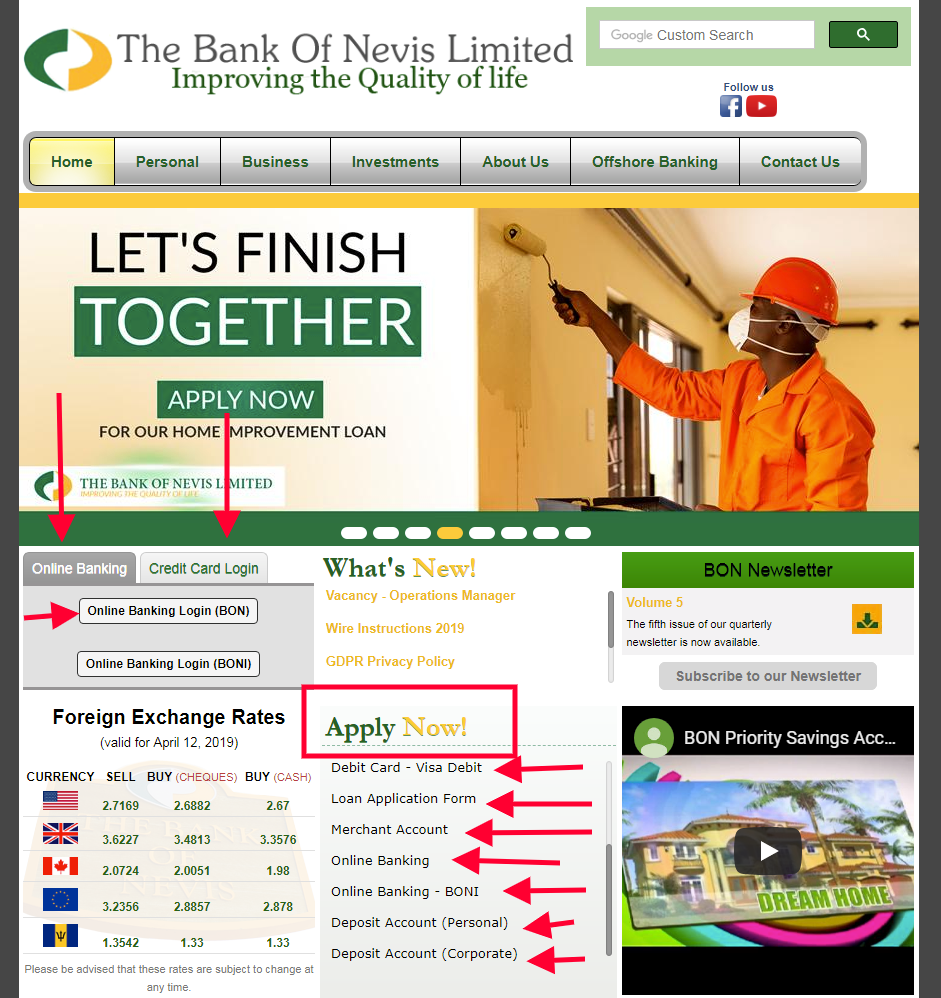
The bank’s official pages show more than one sign-in route. MyBON Online is the enhanced online-banking platform. The same site also labels older or product-specific choices as B-Online, BON, Personal Credit Card, and Business Credit Card. Use the label connected to the service you enrolled in. Do not enter a banking password on a page reached from an unexpected email, text, advert, or search result.

Online banking

  1. Type the official Bank of Nevis website address into your browser or use a bookmark you created earlier.
  2. Find Online Banking Login and choose MyBON Online, B-Online, or BON according to your enrollment.
  3. Check the address and padlock before entering your user ID, username, password, or PIN.
  4. Complete any security prompt shown by the bank, then confirm that your name and accounts look right.
  5. Log out when finished, especially on a computer that other people can use.

Credit-card access

  1. Return to the bank’s official website instead of reusing an old third-party bookmark.
  2. Choose Credit Card Login, then select Personal or Business to match the card account.
  3. Use the credentials issued for that card service. They may differ from MyBON Online details.
  4. If the card page opens but rejects the details, stop after a careful retry and contact Card Services.
  5. Never test your bank password on a credit-card screen just because it looks familiar.


Set Up Online Access

New customers need enrollment before Bank of Nevis Log In will work. The bank publishes personal and business MyBON application forms. Its personal form says the completed form must be printed, signed, and presented to the bank by the stated delivery method rather than submitted through an ordinary web form. Because enrollment instructions can change, take the current form from the bank’s own website and follow the instructions printed on that copy.

  1. Choose the personal or business application that matches the account.
  2. Decide whether online access should cover all eligible accounts or only named accounts.
  3. Use an email address and phone number that the bank already knows.
  4. Sign and deliver the form exactly as the current instructions require.
  5. Wait for the bank’s secure enrollment details before attempting the first sign-in.

If you were moved from an older RBC or RBTT setup, tell customer service that history. The bank’s 2021 conversion notice directed former customers to sign up for Bank of Nevis online access through Customer Services. That context can help staff find the correct profile instead of creating a duplicate one.


Known Issues & Common Problems

Most access failures fall into four groups: the wrong product portal, an enrollment mismatch, browser trouble, or a security lock. The Bank of Nevis website itself shows several different entry points, so start by confirming the service name before changing anything. If an account was converted from an older system or the bank has updated its platform, an old bookmark may no longer represent the right route.

Wrong login service: MyBON Online, B-Online, BON, and credit-card access are not interchangeable labels. Go back to the official homepage and choose the service connected to your enrollment.

Old bookmark: A saved page can outlive a platform change. Remove it, begin from the bank’s current homepage, and create a fresh bookmark only after the correct page loads.

Credentials rejected: Check whether you entered a user ID, username, password, or PIN in the correct field. Repeated guesses can make recovery harder, so stop and ask for a controlled reset.

Page will not load: Test one private window or another updated browser. If the official homepage works but a banking portal does not, record the time and portal name for support.


Troubleshooting Tips

  1. Read the service label first. Confirm whether you need MyBON Online, B-Online, BON, or credit-card access.
  2. Type the username and password once. Watch for an accidental space, Caps Lock, or a saved password from another portal.
  3. Open one private browser window. This tests whether old cookies or cached pages are causing the failure.
  4. Try one other trusted device or connection. Do not use open public Wi-Fi for this test.
  5. If access still fails, note the exact message, service name, time, and last step that worked.
  6. Call support and ask whether the profile is active, locked, or attached to the wrong online-banking service.

Do not keep guessing. A short, clear report gives the bank more useful information than ten repeated attempts. If a payment or transfer is urgent, ask what approved alternative is available while access is restored.

Security Tips

  • Never share your password, PIN, user ID, account number, or login details by email, phone, or voicemail.
  • Ignore messages that threaten immediate account closure and demand personal details.
  • Use a unique password that does not contain a birthday, phone number, address, or family name.
  • Keep your browser, phone, and security software updated.
  • End the session with Log Out. Do not leave online banking open on an unattended screen.
  • If a prompt feels unusual, close it and contact the bank using details from its official website.

The bank says it does not email customers asking them to provide personal login information. Treat any such message as a possible phishing attempt. If you already responded, contact the bank immediately and review recent account activity.


What You Can Do in MyBON Online

The Bank of Nevis describes its enhanced service as a 24/7 account channel. Published features include viewing balances, handling multi-currency accounts, transfers between your own accounts, payments to other local and ECCU banks, international wires, credit-card payments, utility and bill payments, standing orders, and manager’s cheque requests. Available options can depend on account type, currency, permissions, and the service you enrolled in.

  • Check account balances and transaction information before making another payment.
  • Use the correct transfer type: own account, internal, domestic, regional EFT, or international.
  • Verify the beneficiary, currency, amount, and fee before confirming.
  • Save the transaction reference and check that the final status is complete.

If a feature is missing, ask whether your profile needs another permission or enrollment step. Do not assume a missing menu means the entire account is broken.


Contact Customer Service

For a Bank of Nevis Log In problem that survives the checks above, contact the bank directly. The official site lists these general details:

  • Nevis telephone: +1 869 469 5564 or +1 869 469 5796.
  • General email: info at thebankofnevis dot com.
  • Address: P.O. Box 450, Main Street, Charlestown, Nevis.
  • Published opening hours: Monday to Thursday, 8:00 am to 2:00 pm; Friday, 8:00 am to 4:00 pm.

Tell support which portal you used, whether the account is personal, business, or credit card, the exact error, and when it occurred. Never put a password, PIN, full card number, or one-time code in an email. Ask for a case or reference number if the problem cannot be solved during the first contact.


Related Login Guides

If you are comparing recovery steps across online banks, these guides explain similar web and mobile access checks:


Frequently Asked Questions

How do I start Bank of Nevis Log In?

Open The Bank of Nevis official website yourself, choose Online Banking Login, and select the service connected to your enrollment, such as MyBON Online, B-Online, or BON.

Why are there several Bank of Nevis login choices?

The bank separates enhanced online banking, other online-banking access, and personal or business credit-card services. Your credentials may belong to only one of those services.

Can I use my online-banking password for the credit-card portal?

Do not assume so. Choose the correct credit-card entry and use the credentials issued for that service. Contact Card Services if you are unsure.

What should I do if my password is rejected?

Check the portal name and fields, try one careful entry, then stop. Use the bank’s approved recovery process or contact support rather than making repeated guesses.

How do I enroll in MyBON Online?

Use the current personal or business application supplied by the bank. Follow the delivery and signature instructions printed on that form, then wait for secure enrollment details.

What can I do when the login page does not load?

Start from the current official homepage, test one private window or another updated browser, and note the time and portal name if the failure continues.

Does the bank ask for passwords by email?

The bank says it does not email customers asking for personal login information. Do not reply with a password, PIN, account number, or one-time code.

What information should I give customer service?

Give the service name, account type, exact error, time, device, and the last step that worked. Do not include your password, PIN, or full card number.


Summary

For a successful Bank of Nevis Log In, begin at the official homepage, choose the exact service tied to your enrollment, and enter the matching credentials once. If it fails, test a clean browser session and record the error. Then contact the bank with the portal name and time. Keep passwords, PINs, account numbers, and verification codes out of email and ordinary messages.

Independent guide: This is an independent informational guide. It does not provide a login form, does not provide direct login links, does not request passwords or credentials, and does not collect banking data. Use the bank’s official website, app, phone, or support channels directly for account access.

Last Updated on July 13, 2026

URL: https://log-in.me/bankofnevis-charlestown-stkittsandnevis/