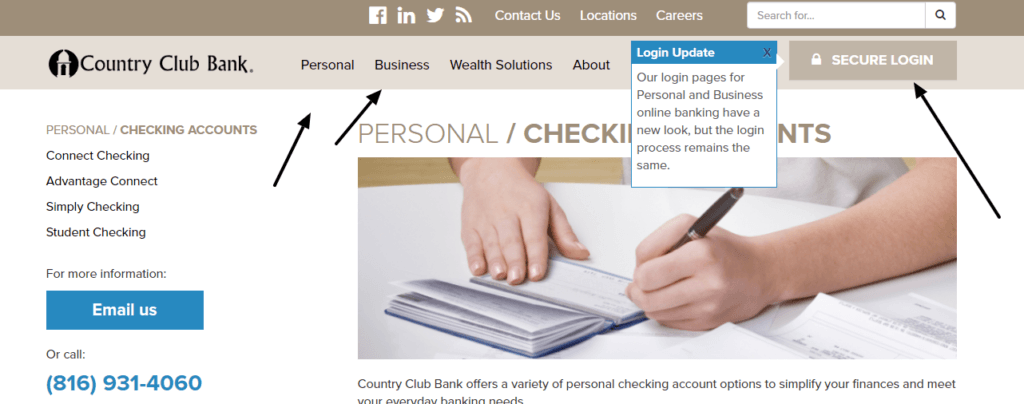
CCB Financial Corporation Log In now means using Country Club Bank’s current digital banking service. CCB Financial Corp, the former parent of Country Club Bank, was acquired by First National Bank of Omaha on October 1, 2025. Country Club Bank continues as an FNBO division during the 2026 brand transition.
Personal customers should use Country Club Bank Personal Online Banking or its mobile app. Organizations choose Business Online Banking or the specialized Lockbox, Merchant Services, or Remote Deposit route assigned to them. Do not use a similarly named CCB or Central Bank site.
How to Log In
For CCB Financial Corporation Log In, start from Country Club Bank’s current ccbfinancial.com website and select the account type. The bank’s login selector separates Personal, Business, Lockbox, Merchant Services, and Remote Deposit profiles. Use only the route shown for the service you actually hold.
Personal Online Banking
- Type Country Club Bank into your browser and open the current official ccbfinancial.com website.
- Open the account login selector and choose Personal.
- Confirm that the page identifies Country Club Bank as a division of First National Bank of Omaha.
- Enter the current personal User ID and continue to the secure password step.
- Complete any device or verification challenge shown by the bank.
- Review balances, recent activity, and alerts before starting a payment or transfer.
- Sign out when finished, especially on a shared computer.
Country Club Bank mobile app
- Install or open the official Country Club Bank mobile banking app from the current store listing.
- Confirm the publisher and branding before entering a User ID.
- Use the enrolled personal Online Banking profile and complete the security questions or password prompt.
- Register the mobile number if the bank asks to enroll a new device.
- Enable facial recognition or a device passcode only after a normal login succeeds.
- Check recipients and amounts before approving mobile transfers, bill payments, or Zelle activity.
- Use the web service if the app is temporarily unavailable on the device.
CCB Financial Corp, Country Club Bank, and FNBO
CCB Financial Corp was the parent company named by this older page. FNBO announced the agreement to acquire it in May 2025 and completed the acquisition on October 1, 2025. The OCC records the same effective date and identifies First National Bank of Omaha as the resulting bank. Country Club Bank now operates as a division of FNBO.
Country Club Bank’s current site and FNBO’s transition page still direct customers to existing Country Club Bank access. FNBO says the Country Club Bank branches are planned for rebranding in fall 2026. Until the bank sends a conversion instruction, use the current Country Club Bank profile rather than creating an unrelated FNBO login.
- CCB Financial Corp: the former holding company referenced by this page.
- Country Club Bank: the current Kansas City customer-facing division and digital banking route.
- FNBO: First National Bank of Omaha, the surviving bank after the October 2025 acquisition.
- Country Club Bank and FNBO deposits in the same ownership capacity are held at the same FDIC-insured bank.
- The Country Club Bank brand and current access remain active during the 2026 transition.
- Follow a bank-issued conversion notice when FNBO schedules a later platform or credential change.
Enroll in Personal Online Banking
Existing Country Club Bank customers can choose Enroll in Online Banking from the official login area. The bank says personal enrollment requires selecting the account type, reading and accepting the disclosures and agreements, and entering account information that matches its records. Most eligible account types can receive access through this process.
Enrollment is not the same as opening a new deposit account. Use the enrollment route only when the customer relationship already exists. Contact the bank if the account information is not accepted, the customer is a business signer, or the service requires a separate agreement.
- Open Enroll in Online Banking from the current Country Club Bank site.
- Select the personal account type and review the current digital banking terms.
- Enter the requested customer and account information exactly as held by the bank.
- Create the User ID and security details requested by the live enrollment flow.
- Register only an email address and mobile number you control.
- Call 816-931-4060 if the profile cannot be verified or the service type is unclear.
Recover a User ID or Password
The current Country Club Bank login area provides a Forgot User ID route. Use the recovery control shown by the live login service and provide only the information it requests. If the password step offers its own reset control, complete it within that same secure session.
Do not repeatedly guess credentials or respond to an unexpected message that asks for account or Social Security numbers. Country Club Bank lists 816-931-4060 for daytime online banking help and 855-259-3192 for personal online banking support outside normal business hours. The bank says customers should not be asked for a debit-card PIN.
- Choose Forgot User ID from the official Country Club Bank login area.
- Use the password-reset control shown only after the correct User ID route is open.
- Complete identity and device verification on a phone or computer you control.
- Update a saved credential only after the new one works.
- Stop after repeated rejection to avoid a longer lockout.
- Call the published support number when self-service recovery cannot finish.
Business and Specialized Login Routes
Country Club Bank Business Online Banking supports account reporting, bill payment, transfers, ACH, payroll, domestic and international wires, loan payments, and transaction approvals. Company administrators can assign granular user entitlements. A personal profile cannot replace those company controls.
Lockbox, Merchant Services, and Remote Deposit are separate choices in the login selector. Use only the service and credential issued to the company. Start with the company administrator when an employee is missing an account, role, approval limit, or token, then call the bank for a confirmed bank-side problem.
- Business Online Banking: ordinary company account access and approvals.
- Lockbox: receivables service access assigned under the company’s agreement.
- Merchant Services: payment-processing access for an enrolled merchant.
- Remote Deposit: check-deposit access for an authorized business user and device.
- Company administrator: manages employee permissions and approval roles.
- Bank support: resolves a confirmed bank-side credential, token, or service problem.
Known Issues & Common Problems
Old CCB Financial bookmark: Start from ccbfinancial.com. CCB Financial Corp is no longer a separate parent-company access destination.
Wrong CCB institution: Confirm Country Club Bank in Kansas City and the FNBO division notice before entering information.
Wrong account type: Personal, Business, Lockbox, Merchant Services, and Remote Deposit use different routes.
Forgotten User ID or password: Use the live recovery control or call the published personal online banking support number.
Android app unavailable: Country Club Bank reported an Android availability issue in May 2026; use web banking and check the bank’s current alert if it persists.
FNBO conversion confusion: Keep using the current Country Club Bank instructions until the bank sends a specific conversion notice.
CCB Financial Corporation Log In problems usually become clearer after separating the old parent name, current division, account type, credential, app availability, and conversion status. Record the exact message and last successful step before contacting support.
Troubleshooting Tips
- Start from Country Club Bank’s current official website.
- Confirm the page identifies Country Club Bank as an FNBO division.
- Choose Personal, Business, Lockbox, Merchant Services, or Remote Deposit correctly.
- Check the User ID, Caps Lock, keyboard layout, and password autofill once.
- Use Forgot User ID or the live password reset instead of repeated guesses.
- Try personal web banking if the mobile app is temporarily unavailable.
- Confirm the registered mobile number can receive verification messages.
- Ask the company administrator about missing business permissions.
- Record the message, time, device, account type, and last successful screen.
- Call 816-931-4060 or the after-hours personal support number when access remains unresolved.
A rejected credential is an access issue. A missing code is a delivery issue. An unavailable Android app is a channel issue. A missing business account may be an entitlement issue. Keeping them separate helps support route the case.
Security Tips
- Type the current Country Club Bank address yourself instead of opening an unexpected banking link.
- Confirm the FNBO division notice and secure connection before entering information.
- Never share a User ID, password, PIN, verification code, or security answer.
- Country Club Bank says it does not request sensitive personal information through unsolicited email, calls, or texts.
- Use an individual business credential and approval device for each employee.
- Avoid public Wi-Fi and keep the device, browser, and security software current.
- Check the recipient, amount, and approval chain before releasing money.
- Call 816-931-4060 immediately for suspicious activity during business hours.
Caller ID and a familiar logo can be imitated. End an unexpected interaction, open the bank’s site independently, and use a published number. Do not send account or Social Security numbers through ordinary email or the general contact form.
Contact Customer Service
- Daytime banking and online banking support: 816-931-4060, Monday-Friday 8:00 a.m.-5:00 p.m.
- After-hours personal online banking support: 855-259-3192 during the hours published on the bank’s contact page.
- Lost or stolen debit card: 800-236-2442.
- Lost or stolen credit card: 800-558-3424.
- Suspicious activity during business hours: 816-931-4060.
- Routing number shown by Country Club Bank: 101001306; confirm instructions for the specific account before moving money.
Tell support which login type, device, and recovery step failed, and whether the issue concerns the Country Club Bank-to-FNBO transition. Never send a password, PIN, verification code, account number, or Social Security number through ordinary email.
Frequently Asked Questions
Where is CCB Financial Corporation Log In now?
Use Country Club Bank’s current website. Select Personal, Business, or the specialized service assigned to the account.
What happened to CCB Financial Corp?
FNBO completed its acquisition of CCB Financial Corp and Country Club Bank on October 1, 2025.
Is Country Club Bank now FNBO?
Country Club Bank is a division of First National Bank of Omaha. Its existing brand and login remain active during the 2026 transition.
How do I enroll in personal online banking?
Choose Enroll in Online Banking, select the account type, accept the current terms, and verify the requested account information.
How do I recover a Country Club Bank User ID?
Use Forgot User ID on the current login area or call the published online banking support number.
What if the mobile app is unavailable?
Use the official Personal Online Banking website and check the bank’s current service alert or call support.
Who handles missing business permissions?
Start with the company administrator. Contact Country Club Bank when the administrator confirms a bank-side issue.
What is Country Club Bank support?
Call 816-931-4060 during business hours. The bank lists 855-259-3192 for after-hours personal online banking support.
Summary
CCB Financial Corporation Log In now routes customers to Country Club Bank, a division of FNBO. Choose the exact personal, business, or specialized service, recover access only through the official site, follow bank-issued transition instructions, and call 816-931-4060 when the correct route does not work.
Independent guide: This is an independent informational guide. It does not provide a login form, does not provide direct login links, does not request passwords or credentials, and does not collect banking data. Use the bank’s official website, app, phone, or support channels directly for account access.
Last Updated on July 13, 2026
URL: https://log-in.me/ccbfinancialcorporation-kansascity-unitedstates/