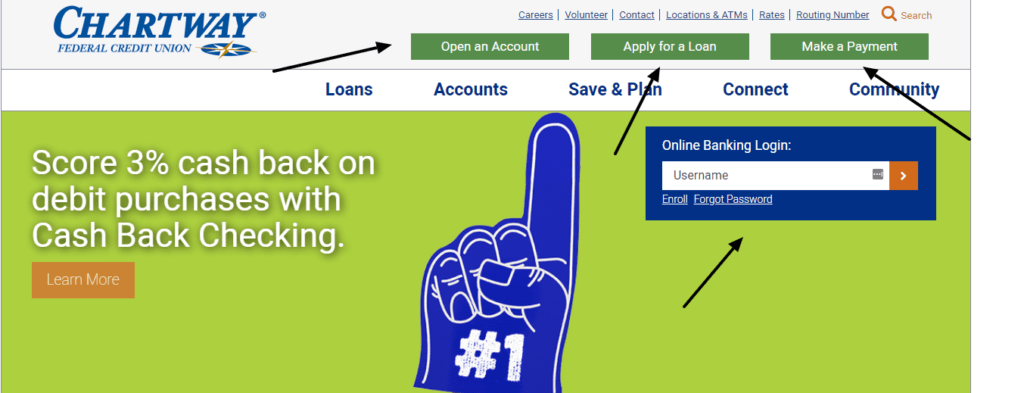
Chartway Federal Credit Union Log In starts from Chartway’s current website or mobile app. Members can use online banking to review accounts and transactions, move money, manage bills and subscriptions, access statements, update contact details, and use card controls.
Chartway now presents its public brand as Chartway Credit Union, but the legal institution remains Chartway Federal Credit Union. Use the green Online Banking Login control on the official Chartway site and avoid saved links from messages or old pages.
How to Log In
Chartway provides online and mobile access for personal members and a separate business enrollment choice. Existing users can sign in from the current homepage; new users should choose the matching personal or business enrollment route.
Chartway online banking
- Type Chartway Credit Union into your browser and open its official website.
- Choose the green Online Banking Login control at the top of the page.
- Enter the username and password registered for the membership.
- Complete multi-factor verification on an unfamiliar device when requested.
- Review the expected accounts and recent activity, then log out.
Chartway mobile app
- Install or open the official Chartway Mobile App from the device’s app store.
- Use the online-banking username and password.
- Complete device verification only when you started the login.
- Review balances, deposits, transfers, payments, statements, and card controls carefully.
- Close the session and protect the device with a screen lock.
Enroll in Online Banking
Chartway’s current enrollment portal asks what type of online-banking account you want to enroll: Personal or Business. Choose the option that matches the membership rather than creating a second profile for an access problem.
You can begin enrollment from Chartway’s website or the Chartway Mobile App. Keep the membership information and current contact details available, and enter sensitive information only after you have opened Chartway yourself.
- Open Chartway’s current online-banking portal.
- Choose Personal or Business.
- Provide the requested membership and identity details.
- Create a unique username and password.
- Complete the verification steps and review the accounts shown.
Useful Account Controls
Chartway says online and mobile banking can show account activity, support external and person-to-person transfers, manage subscriptions, provide financial-management tools, and enroll members in electronic statements.
To update contact information, Chartway tells members to open Settings & Alerts, choose Update Contact Info, edit the details, and save. Keeping the phone and email current is important for multi-factor authentication and fraud alerts.
Known Issues & Common Problems
Account locked: Chartway says lockouts automatically expire after 24 hours. Use Forgot Password or call support if you cannot wait.
Password forgotten: Choose Forgot Password beneath the Online Banking Login area and complete one careful reset instead of guessing repeatedly.
Verification fails: Confirm that Chartway has the current mobile number and email. Support can help when an old contact detail blocks multi-factor authentication.
Account missing: Check Account Display and confirm that the correct membership is linked before creating another online-banking profile.
A card, loan, payment, or linked account can use a different menu or permission even when the main login works. Record the exact error, time, device, account type, and last successful step. If a payment is urgent, confirm whether it is scheduled or posted before trying again.
Troubleshooting Tips
- Start from Chartway’s current website and use the green Online Banking Login control.
- Check the username, Caps Lock, saved password, and accidental spaces once.
- Use Forgot Password instead of repeated guesses.
- Try one private browser window or the current Chartway Mobile App.
- Confirm that the registered phone and email can receive verification messages.
- Record the exact error and last successful step before contacting support.
Change one thing at a time. Chartway says a lockout expires after 24 hours, but support, video banking, or a branch can help sooner. Do not create duplicate profiles while the existing username is being recovered.
Security Tips
- Open Chartway yourself instead of following a login link in an unexpected message.
- Never share an online-banking username, password, PIN, card number, security code, or Social Security number.
- Complete multi-factor authentication only for a login or change that you started.
- Keep the registered phone and email current and review unusual account activity promptly.
- Use a current supported browser and log out before leaving the device.
- Call Chartway directly if an unprompted caller or text asks for confidential information.
Chartway says it will never contact you directly by phone, email, or text to request confidential login or card information. End a suspicious conversation and call the published Member Solutions Center number yourself.
Contact Customer Service
- Member Solutions Center: 800-678-8765.
- Locked account: wait for the 24-hour automatic expiry, use Forgot Password, call the Member Solutions Center, use video banking, or visit a branch.
- Lost or stolen card: call 800-678-8765 at any time.
Give the representative the exact error, time, account type, and last successful step. Ask for a reference number if the problem remains open. Never send a password, multi-factor code, full card number, or Social Security number in ordinary email or chat.
Frequently Asked Questions
Where is Chartway Federal Credit Union Log In?
Open Chartway’s current website and choose the green Online Banking Login control at the top of the page.
How do I enroll in Chartway online banking?
Open the enrollment portal from Chartway’s website or mobile app and choose Personal or Business to match the membership.
What if I forgot my Chartway password?
Choose Forgot Password beneath the Online Banking Login area and follow the prompts for one careful reset.
How long does a Chartway lockout last?
Chartway says online-banking lockouts automatically expire after 24 hours.
Can Chartway unlock the account sooner?
Yes. Call the Member Solutions Center, use video banking, or visit a branch if you cannot wait for the automatic expiry.
Can I use the Chartway mobile app?
Yes. Chartway supports enrollment and account access through its current mobile app as well as the website.
Will Chartway ask for my password by phone or text?
No. Chartway says it will never contact you directly to request confidential login, card, PIN, or Social Security information.
What is Chartway’s support number?
Call the Member Solutions Center at 800-678-8765 for login help, suspicious activity, or a lost or stolen card.
Summary
For Chartway Federal Credit Union Log In, use the green Online Banking Login control on Chartway’s current website or the official mobile app. Choose Personal or Business when enrolling, use Forgot Password for recovery, and remember that Chartway says lockouts expire after 24 hours. Call 800-678-8765 when you need faster help or suspect fraud.
Independent guide: This is an independent informational guide. It does not provide a login form, does not provide direct login links, does not request passwords or credentials, and does not collect banking data. Use the credit union’s official website, app, phone, or support channels directly for account access.
Last Updated on July 13, 2026
URL: https://log-in.me/chartwayfederalcreditunion/