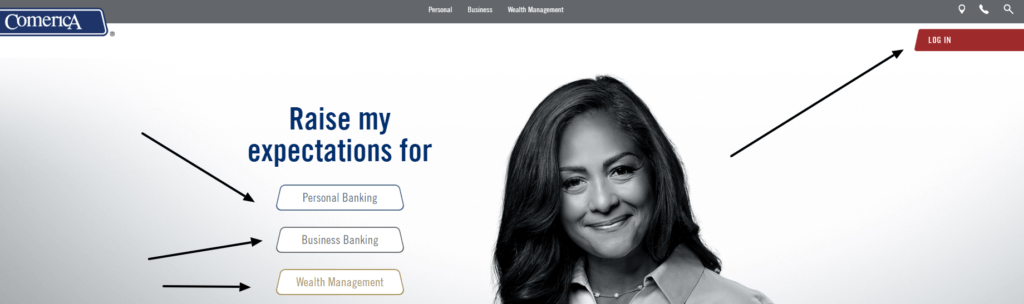
Comerica Bank Log In remains available through Comerica Web Banking and the Comerica Mobile Banking app during the 2026 transition to Fifth Third Bank. Fifth Third completed its merger with Comerica on February 1, 2026, and Comerica now operates as a division of Fifth Third Bank, N.A. The official transition guidance says there are no immediate online or mobile changes and customers should continue using their current Comerica platforms.
Start from comerica.com and choose Log In. The current Comerica Web Banking screen asks for a User ID and Password and provides Forgot Your Password and Set Up Web Banking controls. Do not move a Comerica account to Fifth Third Online Banking unless the bank sends verified conversion instructions for that customer.
How to Log In
For Comerica Bank Log In, type comerica.com yourself, choose Log In, and select Comerica Web Banking. During the Fifth Third transition, keep using the current Comerica platform until official advance notice says otherwise. Confirm the Comerica branding and secure connection before entering a User ID or Password.
Comerica Web Banking
- Type comerica.com into the browser and choose Log In.
- Select Comerica Web Banking when more than one service is offered.
- Confirm the page says Welcome to Comerica Web Banking.
- Enter the enrolled User ID and Password.
- Choose the desired destination only when the option is familiar.
- Select Login and wait for the authenticated account view.
- Review balances, pending items and alerts before a transaction.
- Sign out when finished, especially on a shared computer.
Comerica Mobile Banking
- Open the current Comerica Mobile Banking page from comerica.com.
- Use its Apple or Google store route to identify the official app.
- Confirm the app name and publisher before installation or update.
- Sign in with the active Comerica Web Banking profile.
- Use device authentication only on a personal secured device.
- Review accounts, alerts, deposits, transfers and payments.
- Lock the device and contact Comerica if it is lost or compromised.
Comerica and Fifth Third Transition
The legal merger closed on February 1, 2026. Comerica is now a division of Fifth Third Bank, N.A., but customer systems and branding are still being converted. The official transition page says full system and brand conversions are expected later in 2026 and that customers should continue their usual banking activities until changes are communicated in advance.
For Comerica Bank Log In, that means continuing to use the current Comerica Web Banking or mobile platform today. A message demanding an immediate move, password disclosure or remote computer access conflicts with the bank’s published guidance. Verify every conversion notice through comerica.com or 53.com before acting.
- Merger closing date: February 1, 2026.
- Current legal status: Comerica Bank is a division of Fifth Third Bank, N.A.
- Current digital instruction: continue using existing Comerica online and mobile platforms.
- Expected later step: full system and brand conversion during 2026.
- Official changes should be communicated well in advance.
- Do not consolidate Comerica and Fifth Third credentials without verified instructions.
Enroll or Recover Access
New Web Banking enrollment begins from the Comerica Log In area and its Set Up Web Banking control. The current enrollment flow asks for date of birth, primary account number, account type and customer type before authentication, terms and profile creation. The enrollment guide then asks the customer to create a User ID and Password and confirm an email address and mobile number.
Password reset uses the Forgot Your Password control. Comerica’s current reset page asks for the User ID and email address used for Web Banking, then verifies identity before a new password is created. Customer Service at 888-444-9876 handles additional Web Banking assistance.
- Choose Set Up Web Banking for a first-time profile.
- Have the primary account number and current identity details available.
- Create a User ID and unique Password that meet the live requirements.
- Confirm an email address and mobile number controlled by the customer.
- Use Forgot Your Password instead of repeated guesses.
- Enter the Web Banking User ID and registered email during reset.
- Call 888-444-9876 when online recovery cannot be completed.
Accounts, Statements, Payments, and Deposits
Comerica Web Banking supports checking, savings, CDs and loan accounts, transfers, Bill Pay, external accounts, Zelle, statements and security alerts. The bank says 6 months of account history can be viewed and the last 2 years of eStatements may be available. Pending transactions have been received but have not yet posted.
Comerica Mobile Banking is available to Web Banking customers and supports balances, transaction history, transfers, bill payments, Click&Capture Deposit and person-to-person payments. Availability depends on the account and device. A mobile deposit or scheduled payment should be checked for its status before it is repeated.
- Check the source account, amount, recipient and date before approval.
- Distinguish pending transactions from posted transactions.
- Save the confirmation for every transfer, payment or deposit.
- Verify a Zelle recipient independently before sending money.
- Review the captured check amount and images before mobile submission.
- Keep the original check until the deposit is confirmed.
- Report an unknown, duplicated or missing transaction promptly.
Security Alerts and Merger Scams
Comerica Web Banking can send email alerts when a User ID, Password, security questions, email or phone number changes or when the user is locked out. Treat an alert you did not trigger as an account-security event and contact the bank using an independently verified number.
The current Fifth Third and Comerica transition guidance specifically warns that the banks will not call, email or text asking for personal information, login credentials or computer access. Do not respond to a conversion message that asks for a password, one-time code, card PIN or remote-access installation.
- Review every profile-change and lockout alert promptly.
- Use the number on the back of the card for an unexpected request.
- Do not disclose credentials to a caller claiming to migrate the account.
- Do not install remote-control software for a banking conversion.
- Confirm transition news at comerica.com or 53.com.
- Keep contact information current so real notices arrive.
- Review account activity after any access or profile problem.
Known Issues & Common Problems
Unexpected Fifth Third login prompt: Continue with the current Comerica platform unless verified conversion instructions were sent in advance.
Password is rejected: Use Forgot Your Password with the Web Banking User ID and registered email address.
User ID is forgotten or locked: Call Web Banking Customer Service at 888-444-9876 rather than repeatedly guessing.
Account is missing: Check signer status and account eligibility, then ask Comerica to review profile linking.
Payment remains pending: Confirm whether it has posted or is still processing before sending another payment.
Merger message requests credentials: Do not respond; call the number on the card or current relationship team independently.
Comerica Bank Log In problems may involve the current platform, enrollment, password recovery, account linking, transaction status or the Fifth Third transition. Record the exact message and last successful step, then use the support route for that layer.
Troubleshooting Tips
- Start from comerica.com and choose the current Log In control.
- Continue using Comerica Web Banking during the announced transition period.
- Check the User ID, Password, Caps Lock and keyboard layout once.
- Remove stale password autofill for this attempt.
- Use Forgot Your Password instead of repeated guesses.
- Confirm the registered email and mobile number are current.
- Use a supported, current browser on a trusted device and network.
- Check whether the transaction is pending or posted.
- Record the error, time, device and last successful screen.
- Call 888-444-9876 when Web Banking access still fails.
An unannounced platform change is a transition problem. A rejected credential is an access problem. A missing account is a linking or signer problem. A pending payment is a transaction-status problem. Separate them before retrying.
Security Tips
- Type comerica.com yourself instead of opening an unexpected login link.
- Confirm Comerica Web Banking before entering a User ID or Password.
- Never share a password, card PIN, security answer or one-time code.
- Fifth Third and Comerica say they will not request login credentials or computer access by call, email or text.
- Use unique credentials and keep the browser, app and device current.
- Avoid sensitive banking over public Wi-Fi.
- Monitor profile-change alerts and recent transactions.
- Call the card number immediately for suspected fraud.
Merger periods attract impersonation attempts. Do not trust urgency, familiar branding or caller ID. Verify changes through the official transition page or the number printed on the customer’s card.
Contact Customer Service
- Web Banking Customer Service: 888-444-9876.
- Card Service and unauthorized purchases: 800-572-6620.
- Identity Theft Resources: 877-881-8955.
- Automated banking Eastern region: 800-266-3742.
- Automated banking Central region: 800-925-2160.
- Automated banking Mountain/Pacific region: 800-522-2265.
- Transition questions: use the current Comerica/Fifth Third relationship team or official Better Together page.
Tell support whether the issue affects Web Banking enrollment, User ID, Password, profile lockout, account linking, mobile deposit, payment status or merger conversion. Never provide a full Password, PIN or one-time code.
Frequently Asked Questions
Where is Comerica Bank Log In?
Start at comerica.com, choose Log In and select Comerica Web Banking.
Should Comerica customers use Fifth Third Online Banking now?
Not unless verified instructions say so. Current transition guidance says to keep using existing Comerica platforms.
When did Fifth Third acquire Comerica?
The legal merger closed on February 1, 2026, and Comerica now operates as a division of Fifth Third Bank, N.A.
How do I enroll in Comerica Web Banking?
Choose Set Up Web Banking and complete account information, authentication, terms and profile creation.
How do I reset a Comerica password?
Use Forgot Your Password and provide the Web Banking User ID and registered email address.
How much account history is available?
Comerica says 6 months of Web Banking history and up to 2 years of eStatements may be available.
Does Comerica support mobile check deposit?
Yes. Eligible Mobile Banking customers can use Click&Capture Deposit through the current app.
What is Comerica Web Banking support?
Call 888-444-9876 for Web Banking enrollment, recovery or access assistance.
Summary
Comerica Bank Log In remains on the current Comerica Web Banking and Mobile Banking platforms while the Fifth Third conversion is prepared. Start from comerica.com, use verified enrollment or recovery controls, protect credentials from merger scams, verify every transaction, and call 888-444-9876 when access remains unavailable.
Independent guide: This is an independent informational guide. It does not provide a login form, does not provide direct login links, does not request passwords or credentials, and does not collect banking data. Use the bank division’s official website, app, phone, or support channels directly for account access.
Last Updated on July 13, 2026
URL: https://log-in.me/comerica-dallas-unitedstates/