Havertys Credit Card Log In is now handled through Synchrony Bank. Existing cardholders can manage the card in a browser or in the MySynchrony mobile app, while a MyHavertys shopping profile is a separate account with separate credentials.
Start by checking the issuer and last digits on the newest card or statement. Use the Synchrony card profile for balances, statements and payments. Use Havertys only for furniture orders, stores and current financing information.
How to Log In
For Havertys Credit Card Log In, identify the Synchrony-issued card first. Type the Havertys or Synchrony address yourself, open the card-management route, and use the username and password registered for that credit-card account.
Credit card website
- Check that the card or statement identifies Havertys and Synchrony Bank.
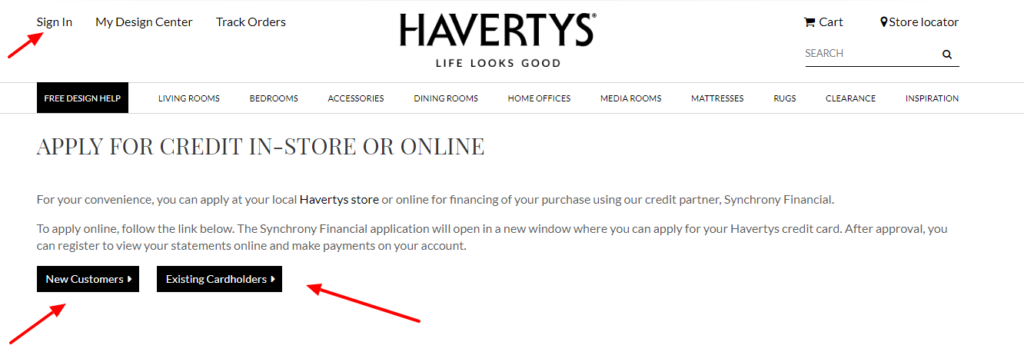
- Type the current Havertys address yourself and open Financing.
- Choose the option for managing an existing Havertys credit-card account.
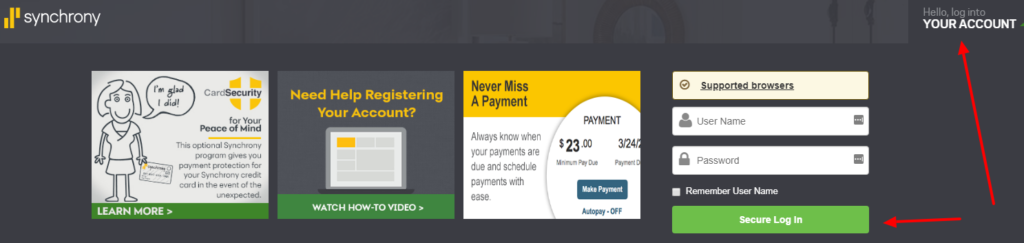
- Confirm that the card service identifies Synchrony before entering credentials.
- Enter the current Synchrony username and password.
- Review the card ending, balance, due date and recent activity.
- Sign out completely when finished.
MySynchrony mobile app
- Install or open the current MySynchrony app from the device’s official app store.
- Choose Sign in, or Register if this card has never had online access.
- Use the Synchrony card-account credentials rather than a Havertys shopping password.
- Complete verification only for a session you started.
- Select the Havertys card from the account dashboard.
- Check the payment status and statement before submitting anything new.
- Use biometric access only on a device you control.
First-Time Registration
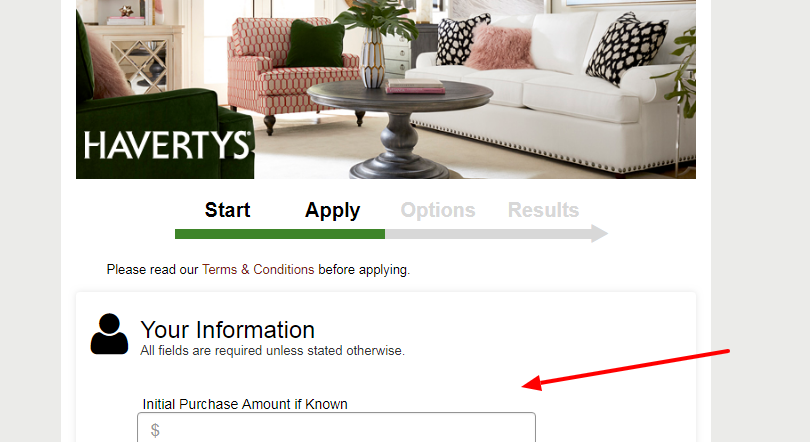
Synchrony says retail-card registration begins from the retail card’s account page. The primary cardholder should have the full account number, the last four digits of the Social Security number and the date of birth available before starting.
After account lookup, verify the displayed card, create a username and password, set security questions, add an email address and confirm the profile. Only the primary account holder can register and use digital servicing for an account with authorized users.
- Start from the current Havertys Financing route.
- Confirm Synchrony as the issuer and servicer.
- Use the full account number from the card or statement.
- Enter identity details only on the verified Synchrony service.
- Create a unique username and password.
- Verify the Havertys card appears before adding a payment account.
- Call the number on the card if the account lookup does not match.
Username, Password, and Account Recovery
Synchrony provides separate recovery paths for a forgotten username, forgotten password and security questions. Use one matching recovery path and wait for its result instead of repeatedly changing several details.
Synchrony’s current sign-in system can place participating cards under one username and password. If a saved password stopped working after a credential update, update the password manager and confirm that it is filling the Synchrony card service rather than MyHavertys.
- Check Caps Lock and the saved username once.
- Use Forgot username when the username is uncertain.
- Use Forgot password when the username is known.
- Request only one verification message at a time.
- Check filtered email and blocked text messages.
- Update an old phone number through verified support.
- Call the number on the card when online identity validation fails.
Payments, Autopay, and Statements
Havertys says the Synchrony account can show the balance, update account information and schedule payments. Synchrony says its online service and app can make same-day payments, schedule future payments, manage payment bank accounts and provide confirmation by email.
Before submitting a payment, check the card ending, amount, payment date, funding account and any existing automatic payment. A manual payment may affect an automatic amount without necessarily cancelling the automatic instruction. Save the confirmation and check whether the payment is scheduled, pending or processed before trying again.
- Read the current statement balance and minimum due.
- Check the due date and Eastern Time payment cutoff.
- Verify the funding account ending.
- Review any scheduled or automatic payment.
- Submit the payment only once.
- Save the confirmation email or number.
- Call support before repeating a payment that is not visible.
Current Financing Terms Need a Fresh Check
The old page described a 29.99% purchase APR and a fixed set of promotional periods. Those details are no longer current. Havertys currently states that new accounts as of July 31, 2025 have a 34.99% purchase APR, a 39.99% penalty APR and a $2 minimum interest charge, while existing cardholders must use their own agreement.
Promotional financing can use equal-payment offers or deferred-interest offers. With deferred interest, failing to pay the full promotional balance within the offer period can cause interest to be charged from the purchase date. Treat the newest card agreement and checkout disclosure as controlling because offers, thresholds and dates can change.
- Read the exact offer shown for the current purchase.
- Check whether it is equal-payment or deferred-interest financing.
- Confirm the minimum purchase and down-payment rule.
- Do not assume the minimum payment clears a deferred-interest balance.
- Use the account’s own agreement for the applicable APR.
- Keep the purchase disclosure and monthly statements.
- Ask Synchrony to explain a promotion before its deadline when anything is unclear.
Known Issues & Common Problems
MyHavertys password does not work: The furniture-shopping profile and Synchrony credit-card profile are separate. Use the credentials registered for the card service.
Card is missing from the dashboard: Use Add Account when available, then verify the card and primary-cardholder details. Call the number on the card if it cannot be associated safely.
Verification message does not arrive: Check the registered phone and email, request one message, and use card support when the contact details are old.
Payment appears missing: Check scheduled, pending and processed activity plus the confirmation email before attempting another payment.
Autopay amount looks wrong: Compare the selected autopay rule with the statement balance, minimum due and any additional manual payments.
Promotion did not clear the balance: Minimum payments may not pay a deferred-interest promotion in full. Read the promotional expiration and contact Synchrony before the deadline.
Havertys Credit Card Log In problems usually involve the wrong account type, a missing account association, outdated recovery details or an uncertain payment state. Record the exact error, card ending and last successful step. Do not create duplicate profiles or duplicate payments while the status is unclear.
Troubleshooting Tips
- Start from Havertys Financing or Synchrony’s account finder.
- Confirm the page identifies Synchrony before entering details.
- Use card credentials, not a MyHavertys shopping password.
- Check the username and saved password once.
- Use the matching username or password recovery path.
- Request only one verification message.
- Try a current browser or the MySynchrony app on a trusted network.
- Check scheduled, pending and processed payments.
- Save the exact error and time.
- Call card support when identity or payment status remains unclear.
Separate the problem first: sign-in, registration, verification, payment or promotion. Change one thing at a time. If a payment may already exist, confirm its status before submitting another one.
Security Tips
- Type the Havertys or Synchrony address yourself.
- Never share a password, PIN, security code or one-time code.
- Do not sign in from an unexpected email, text, ad or QR code.
- Approve only devices and payments you initiated.
- Use a unique card-account password.
- Turn on useful transaction and payment alerts.
- Review statements and unfamiliar activity promptly.
- Call the number on the card after suspected fraud or a lost phone.
A caller can know the Havertys name without representing Synchrony. End unexpected contact and call the number printed on the physical card or newest statement. A legitimate agent does not need your password or one-time code.
Contact Customer Service
- Havertys/Synchrony card account and payments: 866-396-8254.
- Card-specific access or suspected fraud: use the number printed on the back of the card or newest statement.
- Havertys furniture order or store help: use Havertys customer service, not card support.
- Online self-service: start from Havertys Financing and choose management for the existing Synchrony card.
Tell support whether the problem concerns sign-in, registration, verification, payment, autopay or promotional financing. Give the card ending and exact error, but never provide a password or one-time code. Ask for a case reference when the issue remains open.
Related Login Guides
Frequently Asked Questions
Where is Havertys Credit Card Log In?
Start from Havertys Financing and choose the option to manage the existing Synchrony-issued credit-card account.
Who issues the Havertys Credit Card?
Havertys states that its current consumer credit card is offered through Synchrony Bank.
Is MyHavertys the same as the card account?
No. MyHavertys is a shopping profile, while the credit-card account is serviced by Synchrony and can use different credentials.
What is needed to register the card online?
Synchrony requires the full account number, the last four digits of the primary cardholder’s Social Security number and the date of birth.
Can I manage the card in an app?
Eligible Synchrony-issued cards can be managed in the MySynchrony app for balances, statements, transactions and payments.
How do I recover a forgotten card password?
Use Synchrony’s password recovery from the card sign-in service, request one verification message and call the number on the card if identity validation fails.
How do I make a Havertys card payment?
Sign in to the Synchrony account, verify the card, amount, date and funding account, then save the payment confirmation.
Why is my payment not showing?
Check scheduled, pending and processed activity plus the confirmation email before trying again, then contact card support if the status remains unclear.
What are the current Havertys card rates?
Havertys lists 34.99% purchase APR and 39.99% penalty APR for new accounts as of July 31, 2025, while existing cardholders must check their own agreement.
Can minimum payments clear a promotional balance?
Not always. A deferred-interest offer may require more than the minimum payment to clear the full promotional balance before its expiration date.
Summary
Havertys Credit Card Log In belongs to the Synchrony card account, not the MyHavertys shopping profile. Start from current Havertys Financing information, verify Synchrony, use the card credentials and confirm every payment before submitting it. Read the newest agreement and promotional deadline, because old APR figures and offer periods may no longer apply.
Independent guide: This is an independent informational guide. It does not provide a login form, does not provide direct login links, does not request passwords or credentials, and does not collect banking data. Use the card issuer’s official website, app, phone, or support channels directly for account access.
Last Updated on July 28, 2026
URL: https://log-in.me/credit-card/havertysfurniturecreditcard/