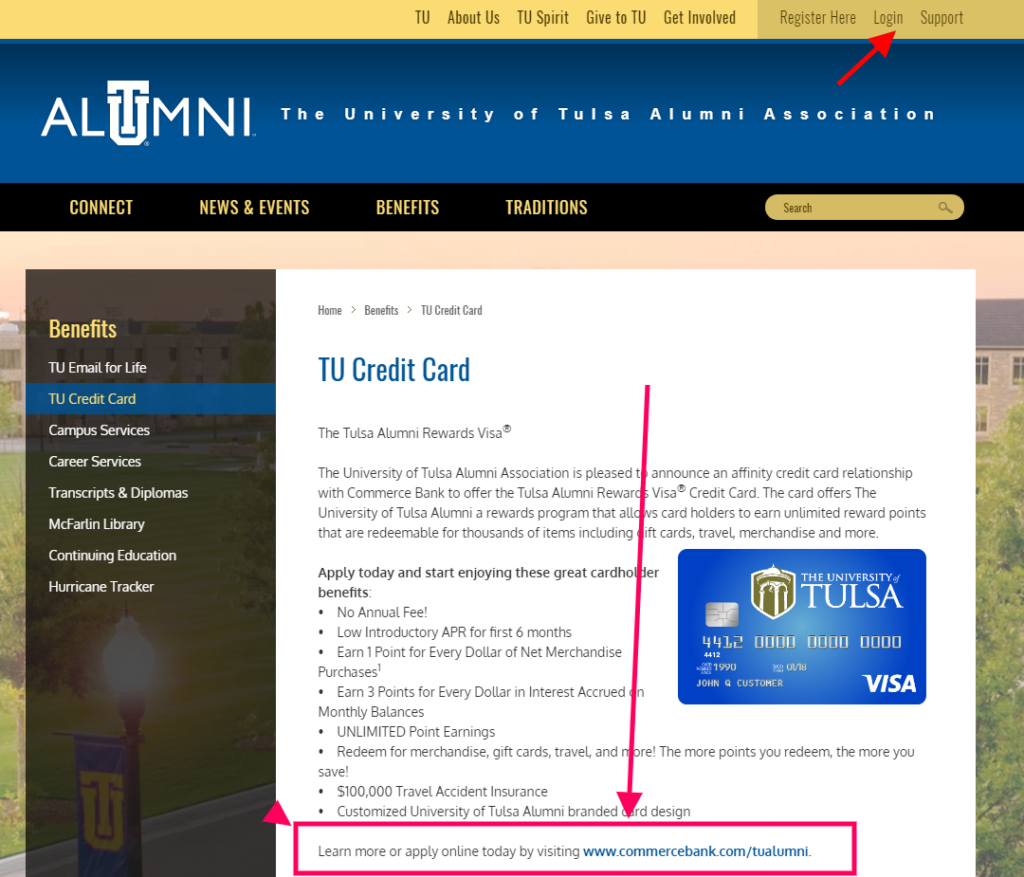
Tulsa Alumni Rewards Visa Card Log In is handled by Commerce Bank, not by The University of Tulsa alumni website. The university’s alumni association identifies Commerce Bank as the issuer of this affinity card, and Commerce Bank still lists the Tulsa Alumni Rewards Visa Credit Card among its current cardholder agreements and pricing disclosures.
Use the alumni page to understand the university relationship or find current application information. Use Commerce Bank Online Banking for the financial account itself: balances, transactions, payments, statements, alerts and reward redemption. Keep those two profiles separate when a password or payment is not working.
How to Log In
For Tulsa Alumni Rewards Visa Card Log In, first confirm that the newest card and statement name Commerce Bank. Then use Commerce Bank’s personal Online Banking or Mobile App. The TU alumni sign-in does not display a credit-card balance and cannot reset the bank’s Customer ID or password.
Commerce Bank Online Banking
- Start from Commerce Bank’s main personal banking site or its Online Credit Card Access page.
- Confirm that the page asks for a Commerce Bank Customer ID and identifies Online Banking.
- Enter the Customer ID registered for the card account.
- Complete the password and any additional verification only for a session you started.
- Select the Tulsa Alumni Rewards Visa account matching the last four digits on the card.
- Review balance, available credit, due date, transactions, statements and payment status.
- Sign out completely when finished.
Commerce Bank Mobile App
- Install or open the current Commerce Bank Mobile App from the official app store.
- Use the same eligible Online Banking Customer ID and password.
- Approve a device or one-time verification only when you initiated the sign-in.
- Choose the card ending that matches the Tulsa Alumni account.
- Check recent activity and the next payment before making a change.
- Use alerts and card controls that are available for the account.
- Protect biometric access with a device passcode you control.
Identify the Issuer and the Correct Profile
The University of Tulsa Alumni Association describes an affinity-card relationship with Commerce Bank. Commerce Bank’s current disclosure index separately lists the Tulsa Alumni Rewards Visa Credit Card. Those two official sources establish that Commerce Bank owns account servicing even though the card carries university branding.
A TU alumni-community profile may manage alumni information, events or benefits, but it is not the credit-card ledger. A Commerce Customer ID belongs to the bank’s digital service. An application profile, alumni profile and active card profile can therefore have different credentials.
- Read Commerce Bank on the newest card or statement.
- Match the last four digits before entering payment details.
- Use TU Alumni for the affinity relationship and alumni services.
- Use Commerce Bank for balances, statements and payments.
- Do not use a university password on a bank sign-in form.
- Do not assume an application status page is Online Banking.
- Call Commerce Bank when issuer or account identity is unclear.
Activate Online Banking for a Credit Card
Commerce Bank publishes a specific activation path for credit-card customers. Registration asks for the name on the card, card number, Social Security number, ZIP Code, three-digit security number and the amount of the last payment. A customer who has not yet made a payment is instructed to enter 0.00 for that field.
Enter those details only after independently reaching the verified Commerce Bank registration service. If the data does not match, stop after one careful review. Repeated attempts will not fix an outdated ZIP Code, changed legal name, replaced card number or account-access restriction.
- Choose Activate Online Banking for first-time access.
- Use the name exactly as it appears on the card account.
- Enter the current card number only on the verified bank form.
- Use the ZIP Code held in Commerce Bank’s account record.
- Provide the requested last-payment amount or 0.00 when applicable.
- Read and accept the current digital-banking terms.
- Save the resulting Customer ID in a secure password manager.
Payments, Statements, and AutoPay
Commerce Bank says Online Banking lets cardholders view transactions, make payments, receive alerts, choose paperless statements and set up recurring payments through AutoPay. Before paying, verify the Tulsa Alumni card ending, payment amount, funding account and processing date.
A reward statement credit can reduce the balance but does not replace the required minimum payment. Review scheduled and pending activity before submitting another payment. Save the confirmation and check the next statement, especially when a payment was made near the cutoff time.
- Read the statement balance, minimum due and due date.
- Check AutoPay and already scheduled payments.
- Verify the funding-account ending.
- Choose the intended payment amount and processing date.
- Submit a manual payment only once.
- Save the confirmation and review its status.
- Call card support before repeating a missing payment.
Rewards and Current Card Terms
The alumni association promotes reward points and a university-branded design, while Commerce Bank identifies the product in its current agreement and pricing-disclosure library. Rates, fees, bonus categories, redemption values and expiration rules can change, so the disclosure for the specific account controls over an old article or a third-party card review.
Commerce Bank says Online Banking can display and redeem eligible reward points. A cash-back statement credit lowers the balance but does not satisfy the minimum payment by itself. Compare the points shown before and after redemption and keep the confirmation until it appears on the statement.
- Open the rewards area for the matching card ending.
- Read the current earning categories and exclusions.
- Check whether a merchant was placed in the expected category.
- Review point expiration and minimum redemption rules.
- Compare cash, travel, gift card and merchandise values.
- Keep paying at least the required minimum after a statement credit.
- Use the account’s disclosure for current APR and fees.
Known Issues & Common Problems
TU Alumni login shows no card: The alumni community and the Commerce Bank financial account are separate. Use Commerce Online Banking for the card.
Customer ID is rejected: Recover the Commerce Bank Customer ID instead of entering the university username or an application email.
Activation details do not match: Check the exact cardholder name, current card number, ZIP Code and last-payment amount before contacting Commerce Bank.
Payment is not visible: Review scheduled, pending and completed payments plus the confirmation before submitting another one.
Rewards balance seems wrong: Check posting date, merchant category, returns, exclusions and the current product terms for the specific transaction.
Card, PIN or transaction is suspicious: Call Commerce Bank’s 24-hour card service promptly and do not continue troubleshooting through an unexpected message.
Tulsa Alumni Rewards Visa Card Log In failures are easier to solve after separating the university relationship from Commerce Bank account servicing. Identify the profile, card ending and exact failing step before changing credentials or payments.
Troubleshooting Tips
- Confirm Commerce Bank on the newest card or statement.
- Use personal Online Banking rather than the TU alumni profile.
- Recover the Commerce Customer ID or password instead of guessing.
- Check Caps Lock, keyboard layout and saved credentials.
- Use a current supported browser or the current mobile app.
- Verify the registered ZIP Code and last-payment amount for activation.
- Request one verification code at a time.
- Check pending payments before submitting again.
- Record the exact error and last successful screen.
- Call 800-645-2103 when access, card status, PIN or payment remains unclear.
Treat profile identity, first-time activation, credential recovery, card status, payment and rewards as separate problems. Change one thing at a time so the bank can see what actually failed.
Security Tips
- Type the Commerce Bank address yourself or use a trusted bookmark.
- Never share a password, full card number, PIN or verification code.
- Do not enter card details through an unexpected alumni email or advertisement.
- Approve only sign-ins and payments you initiated.
- Use a unique Online Banking password.
- Turn on useful transaction and suspicious-activity alerts.
- Review statements and unfamiliar transactions promptly.
- Report a lost or stolen card through the verified 24-hour number.
University branding can make a fraudulent message look familiar. End unexpected contact and independently call Commerce Bank when a message asks for credentials, money or urgent account verification.
Contact Customer Service
- Commerce Bank 24-hour credit-card service: 800-645-2103.
- Calling collect from outside the United States: 314-514-6299.
- Online account help: use Commerce Bank’s Help or secure-message feature after reaching Online Banking independently.
- TU alumni relationship or benefits: use The University of Tulsa Alumni Association, not the bank, for alumni-profile questions.
Tell support whether the problem concerns Customer ID, activation, password, card status, PIN, payment, rewards or suspected fraud. Provide only the account ending when appropriate and never send a password or one-time code.
Related Login Guides
Frequently Asked Questions
Where is Tulsa Alumni Rewards Visa Card Log In?
Use Commerce Bank personal Online Banking or its Mobile App for the financial account.
Who issues the Tulsa Alumni Rewards Visa?
The University of Tulsa Alumni Association identifies Commerce Bank as the card issuer.
Is the Tulsa Alumni Rewards Visa still listed?
Yes. Commerce Bank currently lists the product in its cardholder agreement and pricing-disclosure library.
Can I use my TU alumni password for the card?
No. The alumni profile and Commerce Bank Online Banking are separate services with separate credentials.
What is needed to activate Online Banking?
Commerce Bank lists the cardholder name, card number, Social Security number, ZIP Code, security number and last-payment amount.
What if I have never made a payment?
Commerce Bank instructs a credit-card customer with no prior payment to enter 0.00 in the last-payment field during activation.
Can I pay the card online?
Yes. Commerce Bank Online Banking supports card payments, statements, alerts and AutoPay.
Does a reward statement credit count as my minimum payment?
No. Commerce Bank says the minimum payment is still required after a statement-credit redemption.
How do I report a lost card or unknown transaction?
Call Commerce Bank’s 24-hour credit-card service promptly at 800-645-2103.
Which terms control rewards, APR and fees?
Use the current agreement and pricing disclosure for the specific account rather than an old article or third-party review.
Summary
Tulsa Alumni Rewards Visa Card Log In belongs to Commerce Bank Online Banking, while The University of Tulsa Alumni Association owns the affinity relationship. Confirm the card ending, use the Commerce Customer ID, activate carefully, verify every payment and reward redemption, and contact the bank promptly for card or fraud problems.
Independent guide: This is an independent informational guide. It does not provide a login form, does not provide direct login links, does not request passwords or credentials, and does not collect banking data. Use the card issuer’s official website, app, phone, or support channels directly for account access.
Last Updated on July 28, 2026
URL: https://log-in.me/credit-card/tulsaalumnirewardsvisacard/