Finabank ❤️ Log In

Security note: This Finabank log in guide does not link to banking login pages. Type the official Finabank address yourself, check that the domain is really Finabank, and never enter your password, temporary password, or verification code after clicking a message, ad, or suspicious email.

Trying to complete Finabank log in for online banking or the Finabank mobile app? Finabank serves customers in Suriname, and its digital banking setup separates personal and business access. The important thing is to start from the official bank site or the official app, then use the correct retail or corporate banking route.

If Finabank log in fails, do not keep guessing. Finabank’s current help information points customers to online banking registration, temporary password steps, username recovery, and Customer Care when access details are missing or the mobile setup does not complete.


How to Log In

Use Finabank Online Banking

  1. Open the official Finabank website by typing the address yourself.
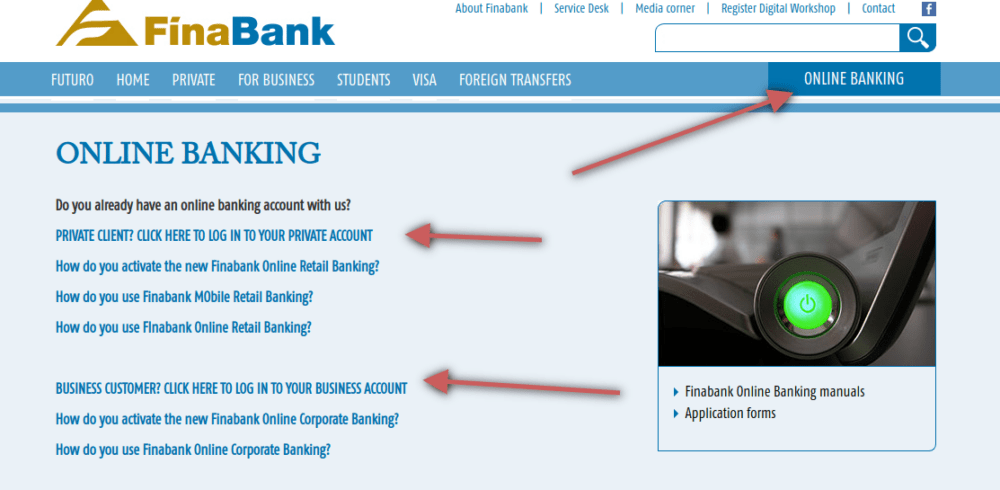
  2. Choose the online banking area.
  3. Select the personal account route if you are a retail customer.
  4. Select the business or corporate route if the account belongs to a company.
  5. Enter your User ID, password, and any verification step only after checking the page is official.

Use Finabank Mobile Banking

  1. Open the official Finabank mobile banking app on your phone.
  2. Use the username or User ID sent to you by Finabank.
  3. Enter the temporary password if you are activating access for the first time.
  4. Use the temporary verification code sent during the setup flow.
  5. Change the temporary password and set your preferred access method, such as PIN, pattern, fingerprint, or Face ID.

Finabank log in works best when you know which channel you are using. A personal user trying the corporate route, or a business user trying the retail route, may see confusing errors even when the account itself is active.


First-Time Access and Setup

If this is your first Finabank log in, you may need to request or activate online banking before normal access works. Finabank says online banking can be requested through Customer Care and that customers need a Finabank payment account, a completed application form, and a valid identity document.

  • Personal banking: Use the retail/personal online banking route if the account is yours as an individual.
  • Business banking: Use the corporate banking route if the account is controlled by a company or organization.
  • Mobile activation: Finabank’s mobile banking help describes a first-login flow with a User ID, temporary password, temporary verification code, password change, and device access method.
  • Missing username: Finabank says customers who lost their username can request it again through Customer Care with valid ID.

For Finabank log in setup, do not send sensitive information through random contact forms or social media accounts. Use contact details from the official Finabank site or the secure message option inside the official app.


Known Issues & Common Problems

Temporary password confusion

During mobile activation, Finabank may send a temporary password and a separate verification code. If you only see one of them, use the official “problems logging in” path instead of trying random combinations.

Username missing

If you lost your username or User ID, Finabank says you can request it again through Customer Care with a valid ID document. This is safer than guessing or relying on old saved browser data.

Wrong banking type

Finabank separates personal and corporate online banking. If your credentials are rejected immediately, confirm that you chose the right customer type before resetting anything.

Old screenshot advice

Older login guides pointed users to a fixed box on the homepage. Finabank’s site and app have changed since then, so follow the current official online banking menu instead of matching an old screenshot.


Troubleshooting Tips and Security Tips

Troubleshooting Tips

  • Check whether you are using the personal or corporate online banking route.
  • Use the official app setup flow if your first Finabank log in has not been completed yet.
  • If the temporary password or verification code is missing, use the official “problems logging in” option.
  • Ask Customer Care to help recover your username if you no longer have it.
  • Stop after repeated failed attempts so you do not make the account harder to unlock.

Security Tips

  • Type the Finabank address yourself instead of using email, SMS, chat, search ad, or social media links.
  • Never share your password, temporary password, verification code, PIN, pattern, or biometric setup details.
  • Install the mobile app only from a trusted app store and confirm the publisher before signing in.
  • Use a private device and avoid public Wi-Fi for Finabank log in and transfers.
  • If you entered details on a suspicious page, contact Finabank immediately and change credentials from a clean device.

Contact Customer Service

For Finabank log in problems, use the contact information shown on Finabank’s official site or inside the official mobile banking app. The bank lists Customer Care for online banking requests, username recovery, activation issues, and branch contact.

  • Online banking request: Contact Customer Care and ask what documents are required for your account type.
  • Username recovery: Prepare a valid ID document before contacting support.
  • Mobile activation problem: Explain whether you received the User ID, temporary password, verification code, or only part of the setup message.
  • Possible fraud: Contact Finabank immediately if you entered credentials on a page that may not have been official.

Related Log In Guides

If you are comparing banking login flows, these related guides may help:


Frequently Asked Questions

Where should I start Finabank log in?

Start from the official Finabank website or the official Finabank mobile app. Do not start from message links, search ads, or screenshots in old guides.

Why does Finabank log in reject my details?

The most common reasons are the wrong customer channel, a missing first-time setup step, an incorrect username, or a temporary password and verification code that were not used correctly.

What should I do if I lost my Finabank username?

Use Finabank Customer Care through official contact details and prepare a valid ID document. Finabank says username recovery requires identity verification.

Can I use the same Finabank log in for personal and corporate banking?

Not necessarily. Finabank separates personal and corporate online banking routes, so choose the customer type that matches the account.

What if my temporary password is missing?

Use the official login-problem path in the app or contact Finabank Customer Care. Do not guess passwords or reuse old codes.

Is this page the Finabank login page?

No. This is an independent help guide. For safety, open Finabank directly and check the official domain before entering banking details.

Finabank log in is usually a setup, channel, or verification problem rather than a mystery. Use the right personal or corporate route, keep the official mobile app ready, and contact Finabank through verified channels if username recovery, temporary password setup, or account security is involved.

Last Updated on June 2, 2026

URL: https://log-in.me/finabank-paramaribo-suriname/