CIBC Caribbean Barbados ❤️ Log In

FirstCaribbean International Bank Log In now uses the CIBC Caribbean identity. The group adopted the CIBC Caribbean brand in 2024, and the Barbados bank’s legal name changed to CIBC Caribbean Bank (Barbados) Limited. Existing accounts continue through CIBC Caribbean Online Banking and the Mobile App.

Barbados customers should use the current Caribbean service, not CIBC Canada and not an old FirstCaribbean bookmark. The Central Bank of Barbados currently lists CIBC Caribbean Bank (Barbados) Limited as an authorized provider and commercial bank.


How to Log In

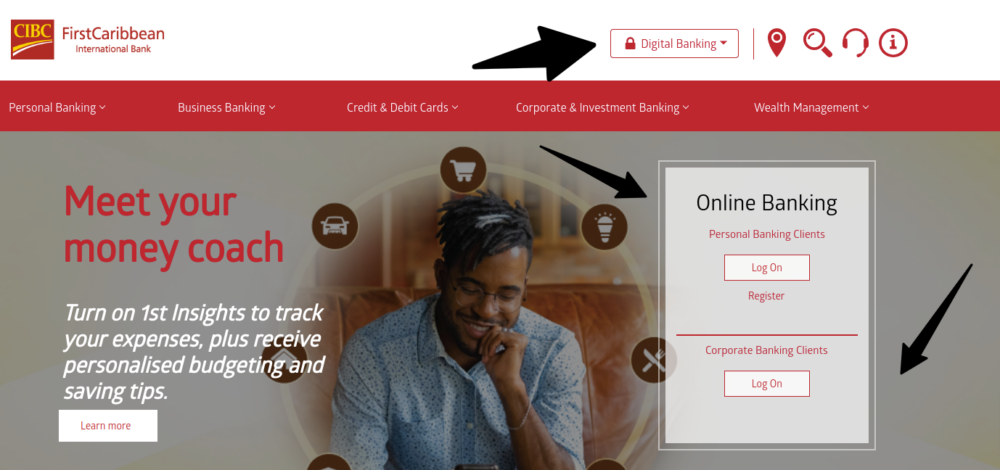
For FirstCaribbean International Bank Log In, type cibccaribbean.com yourself, choose Online Banking and confirm the CIBC Caribbean page before entering the User ID and password. Use the Mobile App only after verifying the current publisher and country service.

CIBC Caribbean Online Banking

  1. Type cibccaribbean.com into the browser yourself.
  2. Choose Online Banking from the current site.
  3. Confirm the address and CIBC Caribbean identity.
  4. Enter the registered User ID and password.
  5. Complete a one-time verification code only for a session you initiated.
  6. Review account names, balances and recent activity.
  7. Sign out completely when finished.

CIBC Caribbean Mobile App

  1. Use the current CIBC Caribbean site to identify the official app.
  2. Confirm the publisher before installation or update.
  3. Sign in with the registered digital-banking profile.
  4. Complete device and one-time-code verification privately.
  5. Review transfers, payments and card changes before approval.
  6. Enable a screen lock and keep the device updated.
  7. Freeze a lost card and call the bank to report it officially.


FirstCaribbean Is Now CIBC Caribbean

FirstCaribbean was created in 2002 from CIBC and Barclays Caribbean operations. The bank later used the CIBC FirstCaribbean name. It announced a further rebrand in late 2023, adopted the CIBC Caribbean brand in 2024 and changed the Barbados operating company’s legal name in July 2024.

The name change does not direct Barbados customers to Canadian CIBC Online Banking. CIBC Caribbean remains a Caribbean-managed business with its own website, app, customer service and country operations.

  1. Treat FirstCaribbean as the former brand.
  2. Use CIBC Caribbean for the current Barbados relationship.
  3. Do not use the Canadian CIBC login.
  4. Replace an old FirstCaribbean bookmark.
  5. Check the current legal name on statements.
  6. Use the correct country and account profile.
  7. Call Barbados support when service identity is unclear.


Registration and Password Recovery

Eligible customers can register for CIBC Caribbean Online Banking. Registration and access should begin from the current CIBC Caribbean site. Keep the account and registered contact details available, but enter sensitive information only after verifying the service.

The current forgot-password process begins by verifying identity with the User ID and email address. A separate forgot-User-ID option is available. If the email or phone on file is no longer accessible, call the bank rather than repeatedly requesting codes.

  1. Start registration from the current Caribbean site.
  2. Use the identity and contact details held by the bank.
  3. Create a unique digital-banking password.
  4. Use Forgot User ID for a missing identifier.
  5. Use Forgot Password with the registered User ID and email.
  6. Request one recovery message at a time.
  7. Call support when old contact details block recovery.

Two-Step Verification and Device Access

CIBC Caribbean may request a one-time verification code before a sensitive transaction. The code is an extra check after the password and should be entered only into the verified service for an action the customer initiated.

Biometric access can make the Mobile App easier to open, but every fingerprint or face profile stored on the device may gain access when biometrics are enabled. Use biometric login only on a personal device with a strong screen lock.

  1. Keep the registered mobile number current.
  2. Never read a verification code to a caller.
  3. Do not approve an unfamiliar device.
  4. Use biometrics only on a personal device.
  5. Remove other people’s biometric profiles.
  6. Keep the app and operating system updated.
  7. Call support after an unexpected verification prompt.

Transfers, Payments, and Card Controls

Online Banking and the Mobile App support account access, transfers and card management. Customers can activate cards, freeze a misplaced card, request a replacement, receive transaction alerts and submit eligible disputes through the digital channels.

Before a transfer or payment, confirm the beneficiary, amount, currency and account. A pending card transaction normally cannot be stopped while it awaits settlement. Do not repeat an uncertain transfer until the account activity and reference have been checked.

  1. Confirm the account and available balance.
  2. Verify the beneficiary and currency.
  3. Review fees and exchange details.
  4. Approve only an instruction you initiated.
  5. Save the transaction reference.
  6. Check pending and posted activity.
  7. Call support before repeating an uncertain instruction.

Fraud, Lost Cards, and Current Scam Warnings

CIBC Caribbean warned in May 2026 about fraudulent calls and messages that imitate the bank and ask for personal banking details. The bank says it will not use social media, text, email or telephone to instruct customers to install remote-desktop software, click a suspicious link or reveal a User ID, password, PIN, card details or one-time verification code.

If a card is lost or an unauthorized charge appears, freeze the card in Online Banking or the Mobile App and call customer service immediately. Freezing is a useful first step, but it does not replace the official report and dispute process.

  1. Do not share a User ID, password, PIN or verification code.
  2. Never install remote-access software for an unsolicited caller.
  3. Do not click a login link in an unexpected message.
  4. Freeze a lost or compromised card.
  5. Call customer service to make the official report.
  6. Review recent transactions and submit eligible disputes.
  7. Send suspected fraud details to the bank’s fraud team.

Known Issues & Common Problems

Old FirstCaribbean bookmark: Use the current CIBC Caribbean site and Online Banking identity.

Wrong CIBC region: Barbados accounts use CIBC Caribbean, not the Canadian CIBC service.

Forgotten User ID: Use the dedicated User ID recovery option on the current login help page.

Password reset fails: Confirm the registered email and call support when old contact details prevent verification.

Verification code is missing: Check the registered mobile number and do not request many codes in quick succession.

Card transaction is unfamiliar: Freeze the card, call the bank and follow the current dispute process.

FirstCaribbean International Bank Log In problems commonly involve the rebrand, the wrong CIBC region, old contact details or one-time-code verification. Identify the current Barbados profile and exact failing step before retrying. Preserve error wording and transaction references for support.


Troubleshooting Tips

  1. Confirm the account belongs to CIBC Caribbean.
  2. Start from cibccaribbean.com.
  3. Replace an old FirstCaribbean bookmark.
  4. Check the User ID and password once.
  5. Use the correct User ID or password recovery option.
  6. Confirm the registered email and mobile number.
  7. Request one verification code at a time.
  8. Try a current browser or the official app on a trusted network.
  9. Check transaction status before resubmitting.
  10. Call 1-866-743-2257 when access remains unavailable.

An old brand is a routing problem. A Canadian login is a region problem. A rejected credential is an access problem. A missing code is a contact-detail problem. An unfamiliar payment is a security problem requiring prompt review.

Security Tips

  • Type the CIBC Caribbean address yourself.
  • Never share User IDs, passwords, PINs or verification codes.
  • Do not install remote-access software for a caller.
  • Approve only devices and transactions you initiated.
  • Use biometrics only on a personal secured device.
  • Freeze a missing card and call the bank.
  • Review alerts and statements regularly.
  • Report suspected fraud immediately.

CIBC Caribbean says it will not contact customers through social media, text, email or phone to request sensitive credentials or remote access. End suspicious contact and use the number on the card or the published customer-service number.


Contact Customer Service

  • 24/7 CIBC Caribbean customer service: 1-866-743-2257.
  • Barbados local and international support: +1 246 431 5490.
  • Fraud reports: [email protected].
  • Digital support: use authenticated chat after signing in when available.
  • Issue escalation: use the Resolution Centre and keep the acknowledgment case number.
  • Barbados regulator: Central Bank of Barbados for unresolved regulatory guidance.

Tell support that the account began under FirstCaribbean or CIBC FirstCaribbean and whether the problem concerns User ID, password, verification code, app access, transfer, card, dispute or suspected fraud. Never send credentials by email.


Frequently Asked Questions

Where is FirstCaribbean International Bank Log In?

Use CIBC Caribbean Online Banking. FirstCaribbean and CIBC FirstCaribbean are former brand names for the current Caribbean service.

Did FirstCaribbean change its name?

Yes. The group adopted the CIBC Caribbean brand, and the Barbados bank’s legal name changed in July 2024.

Should Barbados customers use CIBC Canada?

No. Barbados accounts use the separate CIBC Caribbean website, Online Banking service and Mobile App.

How do I reset the password?

The current recovery process begins with the registered User ID and email address on the CIBC Caribbean login-help page.

What if I forgot the User ID?

Use the separate Forgot User ID option or call customer service when self-recovery cannot verify the profile.

Why is a verification code requested?

CIBC Caribbean uses a one-time verification code as an extra check for sensitive access or transactions.

What should I do with an unexpected code?

Do not share or enter it. Contact CIBC Caribbean independently and review the account for unauthorized activity.

What is the Barbados support number?

Call 1-866-743-2257 toll-free or +1 246 431 5490 for Barbados and international support.


Summary

FirstCaribbean International Bank Log In now uses CIBC Caribbean. Choose the Caribbean service, recover the User ID or password through the current login help, protect every verification code and call 1-866-743-2257 for access, card or fraud support.

Independent guide: This is an independent informational guide. It does not provide a login form, does not provide direct login links, does not request passwords or credentials, and does not collect banking data. Use the bank’s official website, app, phone, or support channels directly for account access.

Last Updated on July 13, 2026

URL: https://log-in.me/firstcaribbeaninternationalbank-stmichael-barbados/