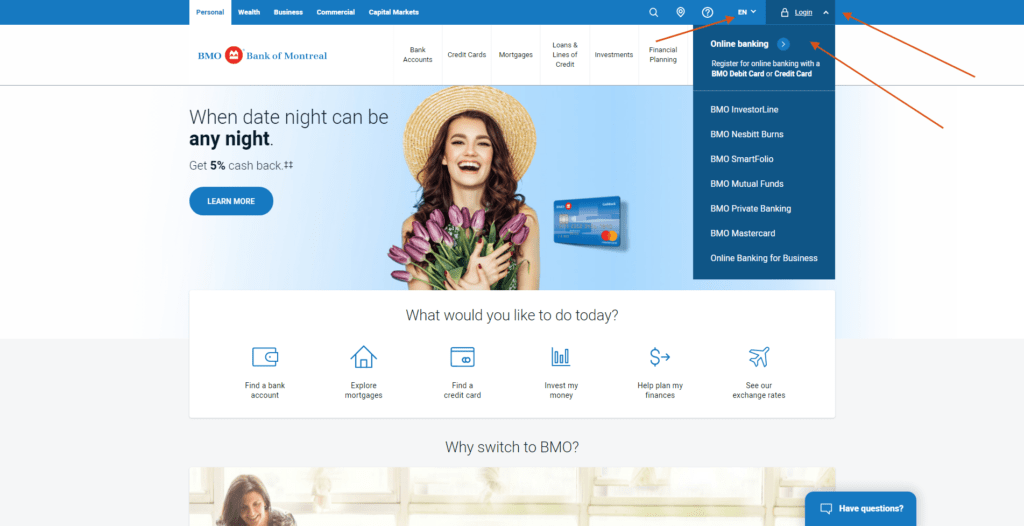
BMO Financial Corp Log In in Wilmington is not a separate consumer-banking portal. BMO Financial Corp is the holding company for BMO’s United States operations, including BMO Bank N.A. Personal and business customers should use the current BMO U.S. digital-banking service.
BMO also operates in Canada, but the U.S. and Canadian login routes are different. Choose the country where the account is held before entering a username, debit-card number, credit-card number, or password.
How to Log In
Use BMO U.S. Digital Banking for a BMO Bank N.A. account. Use BMO Canada Online Banking only for an account held with Bank of Montreal in Canada. The Wilmington holding-company address does not create another login.
BMO U.S. digital banking
- Type BMO U.S. into your browser and open the official United States personal-banking site.
- Choose Sign in and the Digital Banking option.
- Enter the username and password registered for the BMO Bank N.A. account.
- Complete verification only when you started the login.
- Review the expected accounts and recent activity, then log out.
BMO Canada online banking
- Confirm that the account is held with BMO in Canada.
- Open BMO Canada’s official website and choose Sign in, then Online Banking.
- Use the BMO debit or credit card number or Login ID accepted by the Canadian service.
- Enter the Canadian online-banking password and complete any requested verification.
- Check the expected Canadian accounts and log out.
What Is BMO Financial Corp?
The Federal Financial Institutions Examination Council classifies BMO Financial Corp in Wilmington as an intermediate holding company whose primary activity is the offices of bank holding companies. BMO’s current leadership material identifies the same executive as chief executive of BMO Financial Corp and president and chief executive of BMO Bank N.A.
This means the corporate name can appear in regulatory or ownership material without being the name of a customer login. For U.S. checking, savings, loans, cards, or other retail banking, start with BMO Bank N.A.’s current service.
Enroll or Restore Access
BMO U.S. provides enrollment for Digital Banking and supports online and mobile access for bills, accounts, statements, transfers, and other everyday banking tasks. Use the current enrollment route only if the account has never been registered.
For BMO Canada, the current digital-banking guidance says debit-card customers can register through the mobile app and can reset a forgotten password when an email and challenge questions are on file. Do not create a Canadian profile for a U.S. account or the reverse.
- Confirm whether the account is in the United States or Canada.
- Choose the matching BMO country site.
- Use recovery before attempting a second enrollment.
- Keep the registered phone and email current for verification.
- Ask support to confirm the profile when the expected account is missing.
Known Issues & Common Problems
Wrong country: BMO U.S. and BMO Canada use different login details. Return to the country selector and choose where the account is held.
Holding-company confusion: BMO Financial Corp does not provide a separate retail login. U.S. customers use BMO Bank N.A. Digital Banking.
Password reset fails: Confirm the correct country and registered contact details, then use the matching recovery route or call support.
Account missing: Ask whether the product is linked to the current U.S. or Canadian profile before creating another enrollment.
A valid credential can fail when it is entered on the other country’s service or when a specialized card, wealth, or business product uses another route. Record the country, product, exact error, time, and last successful step. Check payment and transfer status before trying an action again.
Troubleshooting Tips
- Confirm whether the account is with BMO Bank N.A. in the United States or BMO in Canada.
- Start from the current official BMO page for that country.
- Check the username or card number, Caps Lock, saved password, and spaces once.
- Use the matching Forgot Password or enrollment route instead of repeated guesses.
- Try one private browser window or the current BMO mobile app.
- Record the exact error, account type, and last successful step before calling support.
Change one thing at a time. Do not create duplicate profiles or switch countries simply because one login failed. For an urgent payment or transfer, ask the correct BMO support team which approved alternative is available.
Security Tips
- Open the correct BMO country site yourself instead of following an unexpected login link.
- Never share a user ID, password, PIN, one-time code, Social Security number, or full card number.
- Complete verification only for a login or change that you started.
- Keep contact details current and enable available account alerts.
- Review unfamiliar transactions and profile changes immediately.
- End an unsolicited call and dial BMO using a number from the official site or physical card.
BMO U.S. says it will not use an unsolicited call or email to ask for a user ID, password, PIN, Social Security number, or other account information. BMO Canada also warns against sharing passwords, PINs, passcodes, or card numbers.
Contact Customer Service
- BMO U.S. general and Digital Banking support: 888-340-2265.
- BMO U.S. consumer credit cards: 855-825-9237 for the listed standard BMO cards; use the number on the card when the product differs.
- Outside the United States: 847-238-2265 for BMO U.S. personal-banking support.
- BMO Canada: use the current Canadian contact centre number shown on BMO’s official site or the back of the Canadian card.
Tell support the country, product, exact error, time, and last successful step. Ask for a case reference if the issue remains open. Never send a password, PIN, one-time code, Social Security number, or full card number in ordinary email or chat.
Frequently Asked Questions
Where is BMO Financial Corp Log In?
BMO Financial Corp is a U.S. holding company, not a separate retail portal. U.S. customers use BMO Bank N.A. Digital Banking.
Is the Wilmington address a bank branch login?
No. The Wilmington address belongs to the holding company and does not create another consumer-banking service.
Are BMO U.S. and BMO Canada logins the same?
No. Choose the country where the account is held and use that country’s current digital-banking service.
How do I enroll in BMO U.S. Digital Banking?
Open BMO’s current United States online-banking page and choose the enrollment option for the eligible BMO Bank N.A. account.
How does BMO Canada sign-in work?
BMO Canada accepts the debit or credit card number or Login ID registered for Canadian Online Banking.
What if the expected account is missing?
Ask BMO to confirm that the product is linked to the correct U.S. or Canadian profile before creating another enrollment.
What is the BMO U.S. support number?
Call 888-340-2265 for general BMO U.S. and Digital Banking support.
Will BMO ask for my password in an unsolicited call?
No. End the conversation and call BMO yourself using the official number or the number on the physical card.
Summary
For BMO Financial Corp Log In in Wilmington, use BMO Bank N.A. Digital Banking for a United States customer account. BMO Financial Corp is the holding company, not a separate retail portal. Canadian BMO accounts use the Canadian service. Choose the correct country, recover the existing profile safely, and call 888-340-2265 for BMO U.S. digital-banking help.
Independent guide: This is an independent informational guide. It does not provide a login form, does not provide direct login links, does not request passwords or credentials, and does not collect banking data. Use the bank’s official website, app, phone, or support channels directly for account access.
Last Updated on July 13, 2026
URL: https://log-in.me/bmofinancialcorp-wilmington-unitedstates/