BNC Bancorp / Pinnacle ❤️ Log In

BNC Bancorp Log In in Thomasville, North Carolina now belongs with Pinnacle Financial Partners. Pinnacle completed its merger with BNC Bancorp in 2017 and moved former BNC Bank customers to Pinnacle’s website and digital-banking systems.

Do not confuse the former North Carolina BNC Bancorp with BNC National Bank in North Dakota or Thomasville National Bank in Georgia. Former BNC Bank customers should start from the current Pinnacle Financial Partners website.


How to Log In

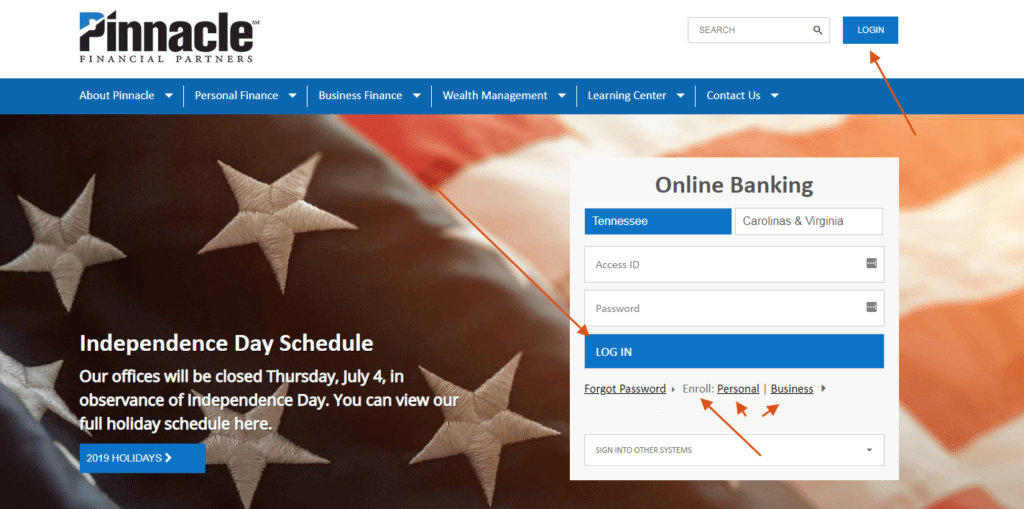
Pinnacle provides separate online-banking enrollment for personal and business clients, a mobile app, password recovery, and other specialized systems. Use the Online Banking route for a former BNC deposit account unless Pinnacle has assigned a separate service.

Pinnacle online banking

  1. Type Pinnacle Financial Partners into your browser and open its official website.
  2. Choose Logins and then Online Banking.
  3. Enter the username and password connected to the converted Pinnacle profile.
  4. Complete a one-time PIN when Pinnacle requests verification.
  5. Check the expected accounts and log out when finished.

Pinnacle mobile banking

  1. Install or open the official Pinnacle mobile app.
  2. Use the same online-banking username and password.
  3. Complete device verification or biometric login only on a trusted device.
  4. Review balances, transfers, bills, deposits, and card controls carefully.
  5. Save transaction confirmations and close the session when finished.


What Happened to BNC Bancorp?

BNC Bancorp was the North Carolina holding company for BNC Bank. Pinnacle Financial Partners says its merger with BNC expanded Pinnacle from four markets to eleven. The former BNC website and login were replaced as customers moved into Pinnacle systems.

A search result using the BNC name can now lead to an unrelated BNC National Bank. Check the location and institution before entering credentials. For the Thomasville, North Carolina BNC Bancorp named in this article, use Pinnacle Financial Partners.


Enroll or Restore Access

Pinnacle’s published enrollment process asks the customer to choose personal or business enrollment, accept the agreement, complete the form, and select security questions. The bank says activation can take up to two business days. After activation, use the chosen username and password.

Pinnacle uses one-time PINs for unfamiliar devices and sensitive actions. Keep the primary email and mobile number current. If the converted BNC profile cannot receive a PIN or the password is forgotten, use Pinnacle’s current recovery route or call its Client Service Center.

  1. Choose Personal or Business enrollment to match the account.
  2. Complete the official form and security questions.
  3. Allow up to two business days for activation when stated by Pinnacle.
  4. Use the current Forgot Password route for a forgotten password.
  5. Call support when the old BNC profile, email, or phone number is not recognized.

Known Issues & Common Problems

Old BNC bookmark: The North Carolina BNC Bank became part of Pinnacle. Start from Pinnacle’s current login page.

Wrong BNC Bank: BNC National Bank is a different institution. Confirm that you need the former BNC Bancorp in North Carolina.

One-time PIN missing: Check the registered email and mobile number. Contact Pinnacle if the old BNC profile contains outdated contact details.

Account missing after login: Ask whether every converted BNC account is linked to the current Pinnacle profile rather than creating another enrollment.

A missing transfer, card, or business approval can be a profile-permission issue instead of a bad password. Confirm whether the account is personal, business, credit card, loan, or another specialized system. Tell support the former BNC relationship, exact error, time, device, and last successful step. Do not keep guessing or submit the same payment twice while status is unclear.


Troubleshooting Tips

  1. Start from the current Pinnacle Financial Partners login page.
  2. Confirm that this is the former North Carolina BNC Bancorp relationship.
  3. Check the username, Caps Lock, saved password, and spaces once.
  4. Try one private browser window or the current Pinnacle app.
  5. Check that the registered email or mobile number can receive a one-time PIN.
  6. Record the exact error, time, account type, and last successful step before calling support.

Change one thing at a time and stop after a careful retry. If a payment or transfer is urgent, ask the Client Service Center which approved alternative is available. Keep the case number and transaction reference.

Security Tips

  • Never enter former BNC credentials on the unrelated BNC National Bank website.
  • Open Pinnacle yourself instead of following a login link in an unexpected message.
  • Never share a password, one-time PIN, full account number, or card security code.
  • Keep the email and mobile number used for verification current.
  • Do not approve an unfamiliar device, transfer, subuser, or external account.
  • Use Pinnacle card controls, but report a truly lost card instead of only turning it off.

One-time PINs protect logins and sensitive actions, but a scammer can try to obtain the code. End any inbound call that asks for it and contact Pinnacle at the published number yourself.


Contact Customer Service

  • Client Service Center: 800-264-3613, answered 24 hours a day, 7 days a week.
  • Small business specialists: 877-380-0654.
  • Pinnacle Anytime automated system: 866-755-5428.

Tell Pinnacle that the account originated with the former North Carolina BNC Bank and identify the account type. Give the exact error and time, but never send a password, one-time PIN, full account number, or card security code in ordinary email or chat. Ask for a reference number if the issue remains open.


Frequently Asked Questions

Where is BNC Bancorp Log In now?

Former BNC Bank customers in North Carolina use Pinnacle Financial Partners after the 2017 merger.

Is BNC National Bank the same bank?

No. Current BNC National Bank is a different institution and should not receive former BNC Bancorp credentials.

How do I enroll in Pinnacle online banking?

Choose personal or business enrollment, accept the agreement, complete the form, and set security questions.

How long can enrollment take?

Pinnacle says an online-banking enrollment can take up to two business days to activate.

Can I use the same login in the mobile app?

Pinnacle says mobile users sign in with the online-banking username and password.

Why did Pinnacle request a one-time PIN?

Pinnacle can require a one-time PIN for unfamiliar devices and sensitive account changes or transfers.

What if my old BNC account is missing?

Ask Pinnacle to confirm that the converted account is linked to the current profile before creating another enrollment.

How do I contact Pinnacle?

Call the Client Service Center at 800-264-3613. Pinnacle says associates answer 24 hours a day, 7 days a week.


Summary

For BNC Bancorp Log In in Thomasville, North Carolina, use Pinnacle Financial Partners. The former BNC Bank merged into Pinnacle in 2017. Start from Pinnacle’s current login page, choose the correct account type, use one-time PIN recovery safely, and call the 24-hour Client Service Center when a converted account or old contact detail is missing.

Independent guide: This is an independent informational guide. It does not provide a login form, does not provide direct login links, does not request passwords or credentials, and does not collect banking data. Use the bank’s official website, app, phone, or support channels directly for account access.

Last Updated on July 13, 2026

URL: https://log-in.me/bncbancorp-thomasville-unitedstates/