Forcht Bank ❤️ Log In

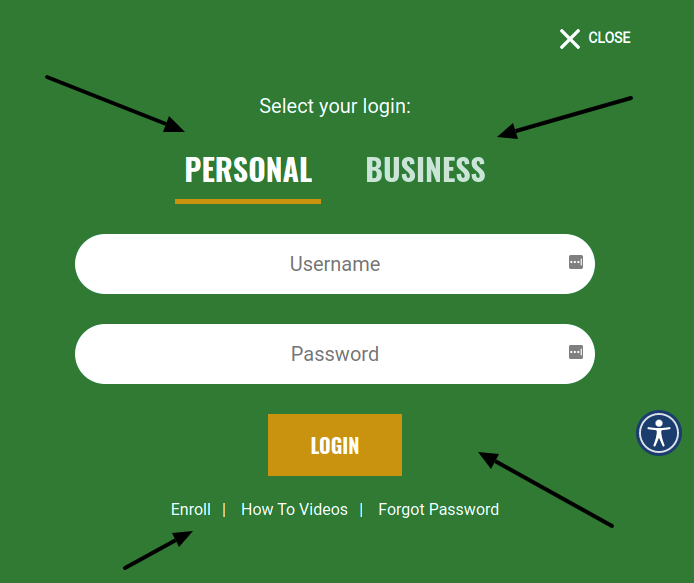
Forcht Bank Log In starts from the bank’s current official website or the Forcht Bank mobile app. The login selector separates Personal and Business access, so choose the profile connected to your accounts before entering a username and password. An old Forcht Bancorp bookmark can point to the wrong place even though the bank itself remains active.

This guide explains personal and business sign-in, enrollment, password recovery, mobile banking, account locks, and safe escalation. It does not provide a login form or send you through an unknown banking link.


How to Log In

Forcht Bank provides personal online banking, a separate business route, mobile apps, and mobile-browser access. Personal customers use the username and password registered for consumer online banking. Business customers should use the Business choice and follow the permissions set by their company administrator.

Personal online banking

  1. Type the official Forcht Bank website address into your browser.
  2. Open the login selector and choose Personal.
  3. Enter the username and password created during enrollment.
  4. Complete any multifactor prompt shown by the bank.
  5. Check that your name and expected accounts appear, then log out when finished.

Business or mobile banking

  1. Choose Business for a company profile; do not test personal credentials there.
  2. For business access, Forcht recommends a current version of Chrome or Edge.
  3. For mobile access, open the official Forcht Bank app or the mobile-enabled bank website.
  4. Use Face ID only after it has been enabled on a trusted device.
  5. End the session and never approve a prompt you did not start.


Enroll or Reset Your Password

New personal customers can choose Enroll from the bank’s login panel. Mobile banking requires an eligible Forcht Bank account and an active consumer online-banking profile. Set up online access first, then install the official app and sign in with the registered profile.

  1. Begin from the bank homepage and select Enroll under the correct Personal or Business route.
  2. Use contact information already recorded by the bank and create a unique password.
  3. For a forgotten password, open the bank recovery page and provide the username, last four digits of the Social Security number, and the email used for online banking.
  4. The bank says a temporary password is sent by email. Use it once and create a new password immediately.
  5. If the email address has changed, call Customer Care instead of creating another profile.

Forcht Bank says three failed login attempts can lock the account. If that has happened, stop retrying and call Customer Care during business hours. Repeated guesses will not unlock the profile and can make it harder to separate a typo from a security lock.


Known Issues & Common Problems

Wrong login type: Personal and Business access are separate. A correct password can still fail when entered into the wrong route. Return to the bank homepage and check the selected profile before resetting anything.

Account locked: Forcht Bank limits access after three failed login attempts. Call Customer Care at the published number to unlock the account instead of continuing to guess.

Temporary password not received: Confirm that the bank has the current email address. Check spam once, but do not request many temporary passwords in quick succession.

Mobile app will not open: Close the app fully, update it, and try again. The bank says deleting and reinstalling the app can help when the current version is damaged.

A missing account, transfer, or approval option can be a permission problem rather than a failed Forcht Bank Log In. Personal customers should confirm that all eligible accounts are linked. Business users should ask their company administrator or the bank whether their role permits the action. If the screen loads but a payment remains pending, record the reference before trying again.


Troubleshooting Tips

  1. Start from the current Forcht Bank homepage and choose Personal or Business carefully.
  2. Enter the username and password once, checking Caps Lock, saved credentials, and spaces.
  3. Use the official password-reset process only when the password is actually forgotten.
  4. Try one private browser window or an updated Chrome or Edge browser.
  5. Close and update the mobile app; reinstall it only from the official app store if needed.
  6. Write down the exact error, time, device, and last successful step before calling support.

Change one thing at a time so the result is clear. Stop after a careful retry if the profile may be locked. For an urgent bill or transfer, ask the bank which approved alternative is available and keep the support reference number.

Security Tips

  • Forcht Bank says it will never contact you first and ask for online-banking credentials, a Social Security number, or a PIN.
  • If a caller asks for private information, hang up and call the bank at its published number.
  • Never share a password, temporary password, one-time code, or full account number.
  • Use a unique password and protect the email account used for recovery.
  • Do not approve an unexpected Zelle transfer, device registration, or password-change prompt.
  • Log out after banking and keep the app, browser, and phone operating system updated.

Treat urgency as a warning sign. A message that threatens account closure or demands immediate verification should not control the next step. Open the bank website yourself or call Customer Care directly.


Contact Customer Service

  • Customer Care and fraud: 844-436-7248.
  • Published chat hours: Monday through Friday, 8 a.m. to 6 p.m.
  • Secure option: use Online Banking Mail after a successful sign-in.
  • Lost or stolen debit card: call the same published Customer Care number immediately.

Tell support whether the problem affects Personal, Business, or Mobile Banking; whether the profile is locked; the exact error; and when it occurred. Do not send a password, PIN, temporary password, Social Security number, or one-time code by ordinary email or chat. Ask for a reference number if the issue remains open.


Related Login Guides


Frequently Asked Questions

How do I start Forcht Bank Log In?

Open the current official bank website, select Personal or Business, and enter the credentials registered for that profile.

What happens after three failed login attempts?

Forcht Bank says the account can lock after three failures. Stop retrying and call Customer Care to have access restored.

How do I reset a forgotten password?

Use the official reset page with the username, last four digits of the Social Security number, and registered email. The bank sends a temporary password.

Can I use online-banking credentials in the mobile app?

Mobile banking requires an eligible Forcht Bank account and an active consumer online-banking profile. Use the profile registered for that service.

What if the app will not open?

Close and update the app. If needed, remove it and reinstall the current official version, then try one careful sign-in.

Which browsers work best for business banking?

Forcht Bank recommends current Google Chrome or Microsoft Edge for its Business Online Banking experience.

Will Forcht Bank call and ask for my password?

The bank says it will never contact you first and request online-banking credentials, a Social Security number, or a PIN.

What number should I call for help?

Call Forcht Bank Customer Care at 844-436-7248 using a number you obtain from the bank website or your account materials.


Summary

Forcht Bank Log In works through the Personal or Business route on the current bank site and through the official mobile app. Choose the right profile, stop after three failed attempts, and use the controlled reset path for a forgotten password. If access remains locked, call Customer Care with the exact error and keep private credentials out of messages.

Independent guide: This is an independent informational guide. It does not provide a login form, does not provide direct login links, does not request passwords or credentials, and does not collect banking data. Use the bank’s official website, app, phone, or support channels directly for account access.

Last Updated on July 13, 2026

URL: https://log-in.me/forchtbancorp-corbin-kentucky-unitedstates/