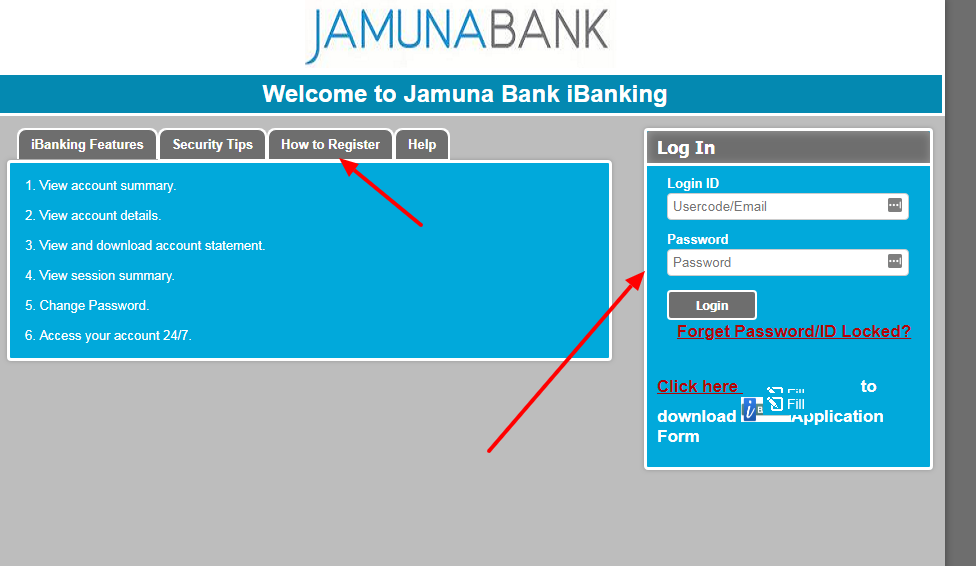
Jamuna Bank ❤️ Log In

Jamuna Bank Log In is available through Jamuna Bank PLC’s Shadhin digital banking service and its official Digital Banking portal. Bangladesh Bank lists Jamuna Bank PLC as a scheduled bank, and the bank’s own website provides the current service routes, registration guidance, recovery rules, and 24-hour hotline.

Individual customers should normally start from jamunabankbd.com and choose Shadhin or Internet Banking. Use the channel for which the account is enrolled, because an older Digital Banking email login and a newer Shadhin User ID are not necessarily the same credential.


How to Log In

For Jamuna Bank Log In, begin at the bank’s current official website. Choose Shadhin for the current app and web service or Digital Banking for an existing profile registered to that portal. Confirm the Jamuna Bank PLC name before entering a User ID, email address, password, or OTP.

Shadhin web or mobile banking

  1. Type Jamuna Bank PLC into your browser and open the current official jamunabankbd.com website.
  2. Choose Shadhin from the Digital Banking menu or open the official Shadhin app.
  3. Confirm the page displays Login, Self Registration, Password Recovery, and Forgot User ID controls.
  4. Enter the current Shadhin User ID and password.
  5. Complete any OTP or device verification requested for the session or transaction.
  6. Review balances and recent activity before making a transfer or payment.
  7. Log out when finished and secure the mobile device.

Existing Digital Banking profile

  1. Open Internet Banking from Jamuna Bank’s current official website.
  2. Confirm the address belongs to digital.jamunabankbd.com and check for a service notice.
  3. Use the registered email address as the login ID for the older Digital Banking profile.
  4. Enter the current password and complete the security prompt.
  5. Stop after a rejected attempt rather than risking the three-attempt lock.
  6. Use Forgot Password for an ordinary recovery or the documented unlock path for a locked profile.
  7. Use Shadhin or call 16742 if the Digital Banking portal is under maintenance.


Choose Shadhin or Digital Banking

Jamuna Bank’s current navigation lists both Shadhin and Internet Banking. Shadhin is the bank’s app and web-based digital banking service with self-registration, password recovery, and User ID recovery. The separate Digital Banking FAQ describes an individual-customer portal that uses the registered email address as its login ID.

Do not assume that one profile’s credential works in the other. Start with the channel originally enrolled or the latest instruction supplied by the bank. The Digital Banking portal was displaying a maintenance notice during this review, while the official Shadhin login remained available. Service status can change, so open the bank’s website for the current route.

  1. Shadhin: current app and web service with a customer-created User ID.
  2. Digital Banking: older individual web profile using the registered email as login ID.
  3. Self Registration: for an eligible Jamuna Bank account with current customer details.
  4. Password Recovery: use the control belonging to the selected channel.
  5. Corporate or specialized service: follow the separate agreement and bank instruction.
  6. Maintenance: use the available official channel or call 16742 instead of a third-party login page.


Register for Shadhin

The official Shadhin instructions say to choose Self Registration, create a User ID, and enter the account number, account title, mobile number, email address, and date of birth. The customer then enters the OTP received by SMS or email. A successful registration sends a confirmation email with the User ID and a temporary password.

Change the temporary password after the first login. Registration details must match the bank’s customer record. If the mobile number, email, date of birth, or account title is outdated, contact the branch or hotline instead of changing answers repeatedly.

  1. Choose Self Registration from the official Shadhin login page.
  2. Create a unique User ID for future Shadhin access.
  3. Enter the account number and account title exactly as held by the bank.
  4. Provide the registered mobile number, email address, and date of birth.
  5. Enter the OTP delivered by the bank and wait for the confirmation email.
  6. Use the temporary password once, then create a private new password.

Recover or Unlock Access

Shadhin provides Password Recovery and Forgot User ID controls on its official login page. Use the one that matches the missing credential and complete the live identity checks. For the separate Digital Banking profile, the bank says Forgot Password requires the requested details and memorable-question answer.

Jamuna Bank’s Digital Banking FAQ says three consecutive wrong password attempts lock the login ID, and 90 days without login can make it inactive. Its documented unlock process begins from the registered email address to [email protected] with the registered email, phone number, and account number. Because email is less private than the secure portal, confirm the current procedure with 16742 before sending account information.

  1. Choose Password Recovery or Forgot User ID in the correct official channel.
  2. Stop before a third wrong password attempt on the Digital Banking profile.
  3. Record whether the message says wrong password, locked, inactive, or maintenance.
  4. Confirm that the registered phone and email are still accessible.
  5. Call 16742 to verify the current unlock process before sending account details by email.
  6. Change a temporary or recovered password immediately after access returns.

Transfers and Transaction Approval

Jamuna Bank says its digital services can support transfers within the bank, inter-bank transfers through BEFTN or RTGS, statements, cheque-book requests, utility bills, card information, and other account functions. Availability depends on the channel and the customer’s enrollment.

An OTP or app approval authorizes a financial instruction. Read the beneficiary, bank, account, amount, fee, and transfer method before confirming. Do not approve a request created by an unknown caller, even if the caller claims a security problem.

  1. Confirm the source account and available balance.
  2. Read the beneficiary name, bank, and account number carefully.
  3. Choose the transfer method that matches the timing and amount.
  4. Check the amount, fee, and displayed total before entering an OTP.
  5. Save the transaction reference and verify the final status.
  6. Call the bank immediately for an unknown or duplicated transaction.

Known Issues & Common Problems

Shadhin or Digital Banking mismatch: Use the channel in which the profile was enrolled; a Shadhin User ID and an older email login are different identifiers.

Portal under maintenance: Return through Jamuna Bank’s official site, try the available Shadhin channel, or call 16742.

Forgotten User ID or password: Use the matching Shadhin or Digital Banking recovery control instead of repeated guesses.

Profile locked after attempts: The Digital Banking FAQ says three wrong passwords lock the ID. Stop and verify the unlock path with the bank.

Profile inactive after 90 days: The bank says an unused Digital Banking ID can become inactive and require an unlock.

OTP does not arrive: Check the registered phone and email, then call 16742 rather than requesting codes repeatedly.

Jamuna Bank Log In problems usually become clearer after separating the channel, User ID type, password, account status, service availability, and OTP delivery. Record the exact message and last successful step before contacting support.


Troubleshooting Tips

  1. Start from Jamuna Bank PLC’s current official website.
  2. Choose Shadhin or Internet Banking according to the enrolled profile.
  3. Use the Shadhin User ID or registered Digital Banking email correctly.
  4. Check Caps Lock, keyboard layout, and password autofill once.
  5. Use Password Recovery or Forgot User ID instead of repeated guesses.
  6. Stop before the third wrong Digital Banking password attempt.
  7. Check whether the portal shows a maintenance notice.
  8. Confirm the registered phone and email can receive OTP or recovery messages.
  9. Record the error, time, device, channel, and last successful screen.
  10. Call 16742 when the correct official route remains unavailable.

A wrong identifier is a channel issue. A rejected password is an access issue. A missing OTP is a delivery issue. A maintenance page is a service issue. Keeping these separate helps Jamuna Bank route the case.

Security Tips

  • Type Jamuna Bank’s current address yourself instead of opening an unexpected banking link.
  • Confirm Jamuna Bank PLC and the secure connection before entering information.
  • Never share a User ID, password, OTP, PIN, memorable answer, or temporary password.
  • Register only a phone and email controlled by the account holder.
  • Change a temporary password immediately and protect the device with a lock.
  • Read the beneficiary and amount before approving a transfer.
  • Do not allow an unknown caller to view or control the banking device.
  • Call 16742 immediately for unknown access or transactions.

A logo, caller ID, or urgent message does not prove a request is genuine. End the interaction, open Jamuna Bank’s site or Shadhin app independently, and use the published hotline.


Contact Customer Service

  • Jamuna Bank 24/7 hotline: 16742 within Bangladesh.
  • General query or complaint: 16742 or [email protected].
  • General bank email: [email protected].
  • Credit card support: +8809610005678 or [email protected].
  • Digital Banking unlock: confirm the current process with 16742 before emailing account information.
  • Corporate office: Jamuna Bank Tower, Plot 14, Bir Uttam A. K. Khandaker Road, Block C, Gulshan 1, Dhaka.

Tell support whether the issue affects Shadhin or Digital Banking, web or app, and whether the profile is rejected, locked, inactive, or under maintenance. Never provide a password, PIN, or OTP to an agent.


Frequently Asked Questions

Where is Jamuna Bank Log In?

Start from jamunabankbd.com and choose Shadhin or Internet Banking according to the profile already enrolled.

What is the Shadhin login ID?

Shadhin uses the User ID created during self-registration. The older Digital Banking profile uses the registered email as login ID.

How do I register for Shadhin?

Choose Self Registration and provide the account details, registered phone, email, and birth date, then verify the OTP and change the temporary password.

How do I recover a Shadhin password?

Use Password Recovery on the official Shadhin page and complete the requested identity checks.

Why is the Digital Banking ID locked?

Jamuna Bank says three consecutive wrong passwords lock the ID. Stop guessing and confirm the unlock process with 16742.

Can an unused profile become inactive?

Yes. The Digital Banking FAQ says 90 days without a login can make that profile inactive.

What if Digital Banking is under maintenance?

Return through the bank’s official site, use the available Shadhin service if enrolled, or call 16742.

What is Jamuna Bank support?

The bank publishes 16742 as its 24-hour hotline and +8809610005678 for credit-card support from abroad.


Summary

Jamuna Bank Log In is available through official Shadhin and Digital Banking channels. Choose the enrolled profile, protect every OTP, use self-registration or recovery only on Jamuna Bank’s site or app, and call 16742 when access is locked, inactive, or unavailable.

Independent guide: This is an independent informational guide. It does not provide a login form, does not provide direct login links, does not request passwords or credentials, and does not collect banking data. Use the bank’s official website, app, phone, or support channels directly for account access.

Last Updated on July 13, 2026

URL: https://log-in.me/jamunabank-dhaka-bangladesh/